Published: October 17, 2025 | Updated: [Current Month] 2026 | Read Time: 12 min
Author: Emily Carter, M.S., Sr. Content Team Lead (Verified)
Powered by 3M+ hours of digital marketing experience
Can you do SEO yourself?
Yes. You can handle many SEO tasks yourself — including basic keyword research, on-page optimization, content updates, Google Business Profile management, and analytics setup — with free tools and a willingness to learn.
That said, not every part of SEO is equally DIY-friendly. Technical audits, site speed engineering, structured data, and high-quality link building are harder to execute well without experience. In many cases, a hybrid approach works best: keep simple high-impact tasks in-house, and outsource complex or time-intensive work.
This guide breaks down:
- Which SEO tasks you can confidently DIY
- Which tasks are worth outsourcing
- How to start step by step
- Free tools, timelines, and a 30/60/90-day plan
- When hiring an agency becomes the smarter move
[Primary CTA Button: Get Your Free SEO Score in 60 Seconds]
Instant site health check + prioritized fixes. No spam.
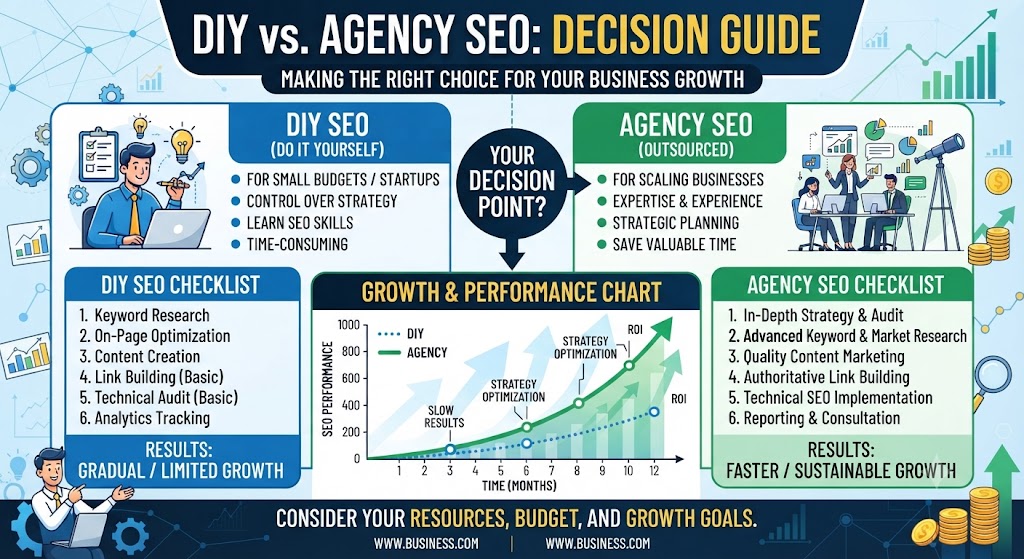
Quick Navigation
- DIY vs Agency: Quick Comparison
- 6 SEO Tasks You Can Do Yourself
- 5 SEO Tasks to Outsource
- Best Free DIY SEO Tools
- 30/60/90-Day DIY SEO Plan
- DIY vs Agency Cost & Timeline
- Signs You’ve Outgrown DIY
- FAQs
- Next Steps
DIY vs Agency: Which SEO Tasks Belong Where?
| SEO Task | DIY? | Outsource? | Why |
|---|---|---|---|
| Initial SEO audit (basic) | ✅ | Optional | Great starting point with free tools |
| Keyword research | ✅ | Optional | Doable with free/freemium tools |
| On-page optimization | ✅ | Optional | High impact and learnable |
| Content creation | ✅ | Hybrid | In-house voice + optional editorial support |
| Google Business Profile management | ✅ | Optional | Essential and beginner-friendly for local SEO |
| Basic analytics setup | ✅ | Optional | Free and critical for decision-making |
| Technical SEO audits | ❌ | ✅ | Easy to miss issues without expertise |
| Link building & outreach | ❌ | ✅ | Time-intensive and quality-sensitive |
| Page speed & Core Web Vitals | ❌ | ✅ | Often needs dev-level fixes |
| Structured data (schema) | ❌ | ✅ | Easy to implement incorrectly |
| Ongoing strategy & competitor analysis | Hybrid | ✅ | Best with experienced prioritization |
Key takeaway: You don’t need to choose “all DIY” or “all agency.” Most growing businesses win with a hybrid model.
[CTA: Download the Free DIY SEO Checklist (PDF)]
Task list, tools, and weekly workflow in one file.
6 SEO Tasks You Can Do Yourself (& How to DIY SEO)
These are the highest-ROI beginner-friendly tasks. Start here.
1. Initial SEO Audit
Before changing anything, benchmark where your site stands.
A basic SEO audit reviews on-page quality, technical health signals, mobile usability, speed indicators, indexation issues, and content gaps that affect visibility.
How to DIY an initial SEO audit
- Run your URL through a free SEO checker
- Review your SEO score and priority issues
- Note fixes by impact (critical, high, medium)
- Validate top issues in Google Search Console
- Create a simple fix list for the next 30 days
What good looks like:
You have a baseline score, a prioritized issue list, and 3–5 actions scheduled this month.
Tools: WebFX SEO Checker, Google Search Console, PageSpeed Insights, Screaming Frog (free tier)
Time estimate: 1–2 hours for a first pass
Internal links: free SEO checker, SEO audit guide, technical SEO services
[CTA: Run a Free SEO Audit Now]
2. Keyword Research
Keyword research helps you understand what your audience searches for — and which terms you can realistically rank for.
How to DIY keyword research
- List your core services/products and customer problems
- Use free tools to find related keywords and questions
- Prioritize terms by:
- Search intent (informational, commercial, transactional, local)
- Relevance to your offer
- Competition level
- Map one primary keyword to each important page
- Build a content list around supporting long-tail terms
Examples of useful keyword types
- Service + location: “emergency plumber in [city]”
- Problem-based: “why is my website traffic dropping”
- Comparison: “DIY SEO vs agency”
- Question: “how long does SEO take”
Tools: Google Keyword Planner, Google Search Console, KeywordsFX, AlsoAsked, free tiers of Semrush/Ahrefs
Time estimate: 2–4 hours to build a starter keyword map
Internal links: keyword research guide, KeywordsFX, content strategy resources
3. On-Page Optimization
On-page SEO helps users and search engines understand your pages quickly.
How to DIY on-page SEO
For each priority page:
- Write a clear, keyword-informed title tag (about 50–60 characters)
- Add a compelling meta description (about 150–160 characters)
- Use one H1 and logical H2/H3 structure
- Place the primary keyword naturally in the intro
- Optimize image alt text and file names
- Add internal links to related pages
- Strengthen the CTA (call, form, demo, buy)
Quick on-page checklist
- Unique title + meta for every key page
- Descriptive URL slug
- Keyword in H1 where natural
- Short paragraphs and scannable headings
- Original, helpful content (not thin copy)
- Mobile-friendly layout
- Clear next step on the page
Time estimate: 30–60 minutes per important page
Internal links: on-page SEO checklist, title tag guide, internal linking guide
4. Content Creation
Helpful content earns visibility, builds trust, and supports keyword growth.
Your in-house advantage:
- You know customer objections and language
- You can publish with authentic brand voice
- You can answer real sales and support questions
How to DIY SEO content
- Pick a keyword and define search intent
- Review top-ranking pages for gaps
- Outline sections that fully answer the query
- Write clear, useful content with examples
- Add FAQs, visuals, and internal links
- Include one strong CTA
- Update older posts as they age
Content ideas that work for DIY SEO
- “How to” guides
- Service pages with proof and FAQs
- Comparison pages
- Local landing pages
- Cost/timeline explainers
- Case-style project breakdowns
Time estimate: 2–6 hours per quality article (including editing)
Internal links: content marketing services, blog writing guide, content calendar template
5. Google Business Profile Management
If you serve local customers, Google Business Profile (GBP) is one of the highest-ROI DIY SEO channels.
How to DIY GBP optimization
- Claim and verify your profile
- Choose accurate primary/secondary categories
- Complete services, description, hours, and service areas
- Upload real photos of work, team, and location
- Post updates weekly
- Request and respond to reviews
- Keep NAP (name, address, phone) consistent everywhere
What good looks like:
Complete profile, regular posts, recent photos, steady review growth, and fast responses.
Time estimate: 30–60 minutes to optimize; 20–30 minutes/week to maintain
Internal links: local SEO services, GBP optimization guide, review generation guide
6. Basic Analytics Setup
You can’t improve what you don’t measure.
How to DIY basic SEO analytics
- Set up Google Analytics 4 (GA4)
- Verify your site in Google Search Console
- Confirm key pages are indexed
- Track top queries, pages, and click-through rates
- Set conversion events (form submits, calls, purchases)
- Review performance weekly
Weekly metrics to watch
- Clicks and impressions (Search Console)
- Top landing pages
- Query CTR and average position
- Conversions from organic traffic
- Crawl/indexing errors
Time estimate: 1–2 hours to set up; 30 minutes/week to monitor
Internal links: GA4 setup guide, Search Console guide, RevenueCloudFX / analytics resources
[CTA: Download the Weekly SEO Tracking Template]
5 SEO Tasks to Outsource to an Agency
Some SEO work is technically complex, slow to learn, or risky to get wrong. These are the best candidates for expert support.
Expert insight
“Working with an SEO agency saves you time, and you get to work with a team of people who have already tackled whatever digital challenges you’re facing. They’ve seen what works, what doesn’t, and know exactly what to expect — as opposed to DIYing your SEO and trying to figure all of that out for the first time.”
— Trevin Shirey, VP of Marketing, WebFX
1. Technical SEO Audits
Technical SEO covers crawlability, indexation, site architecture, broken links, redirects, mobile usability, canonicalization, and more.
Why outsource:
Advanced issues are easy to miss and easy to misdiagnose without experience and enterprise-grade tooling.
What an agency does:
- Full technical discovery
- Prioritized issue roadmap
- Implementation support with developers
- Validation after fixes
Internal link: technical SEO services
[CTA: Get Help with Technical SEO]
2. Link Building & Outreach
Backlinks remain an important authority signal — but low-quality links can waste time or create risk.
Why outsource:
Effective link building needs digital PR skills, content assets, prospecting systems, and relationship workflows.
What an agency does:
- Safe link acquisition strategy
- Content-led outreach
- Digital PR campaigns
- Reporting on referring domains and relevance
Internal link: link building services / digital PR
[CTA: Get Help with Link Building]
3. Page Speed & Core Web Vitals Optimization
Speed and UX signals affect both rankings and conversion rates.
Why outsource:
Performance work often requires front-end engineering, hosting/CDN configuration, script control, and media optimization without breaking design.
What an agency does:
- CWV diagnosis (LCP, INP, CLS)
- Image/code/delivery optimization
- Developer implementation
- Continuous performance monitoring
Internal link: web performance / CRO / web development services
[CTA: Get Help with Page Speed Optimization]
4. Structured Data Implementation (Schema Markup)
Schema helps search engines understand your content and can support rich results (FAQs, products, ratings, breadcrumbs, and more).
Why outsource:
Incorrect or incomplete JSON-LD can fail validation or create maintenance issues.
What an agency does:
- Schema opportunity mapping
- Correct JSON-LD implementation
- Validation and monitoring
- Alignment with page templates at scale
Internal link: schema markup / technical SEO resources
[CTA: Get Help with Structured Data]
5. Ongoing SEO Strategy & Competitor Analysis
SEO is not “set and forget.” Algorithms, SERPs, and competitors change.
Why outsource:
A strong strategy needs prioritization, forecasting, competitive intelligence, and cross-channel alignment.
What an agency does:
- Roadmap by business goal
- Keyword gap and SERP analysis
- Content/technical priorities
- Monthly optimization cycles and reporting
Internal link: SEO services / enterprise SEO
[CTA: Get a Custom SEO Strategy Proposal]
Best Free (and Freemium) DIY SEO Tools
| Task | Tools to start with |
|---|---|
| Site audit | WebFX SEO Checker, Google Search Console, PageSpeed Insights |
| Keyword research | Google Keyword Planner, KeywordsFX, AlsoAsked, GSC |
| On-page SEO | Browser SEO extensions, heading analyzers, page crawlers |
| Content | Google Docs + NLP assistants, readability checkers, SERP review |
| Local SEO | Google Business Profile, Google Maps, review management process |
| Analytics | GA4, Google Search Console, call tracking (if needed) |
| Technical checks | Rich Results Test, Mobile-Friendly Test, Screaming Frog free tier |
Pro tip: Tools help you find issues. Consistency and implementation create results.
30/60/90-Day DIY SEO Plan
Days 1–30: Foundation
- Run a full baseline audit
- Set up GA4 + Search Console
- Fix critical on-page issues on top pages
- Claim/optimize Google Business Profile (if local)
- Build a starter keyword map
- Publish or improve 2–4 priority pages
Days 31–60: Expansion
- Update title tags/metas across key templates
- Publish consistent intent-matched content
- Build internal links between related pages
- Start a review generation process
- Improve page speed basics (image compression, caching checks)
- Track queries and landing-page CTR weekly
Days 61–90: Optimization
- Refresh underperforming content
- Expand local/service pages where relevant
- Strengthen conversion CTAs and trust signals
- Identify technical issues beyond DIY comfort
- Decide what to keep in-house vs. outsource next quarter
[CTA: Download the 30/60/90-Day DIY SEO Planner]

DIY SEO vs Hiring an Agency: Cost, Time, and Tradeoffs
| Factor | DIY SEO | SEO Agency |
|---|---|---|
| Cash cost | Lower monthly cash outlay | Higher monthly investment |
| Time cost | High (your team’s hours) | Lower internal time burden |
| Learning curve | Steep at first | Faster execution from day one |
| Technical depth | Limited without specialists | Stronger technical coverage |
| Speed to impact | Often slower | Usually faster with prioritization |
| Best for | Early-stage, tight budgets, simple sites | Competitive markets, complex sites, growth targets |
Rough expectations
- DIY SEO: Best when someone can own 4–8 hours/week consistently
- Agency SEO: Often ranges from roughly $1,500–$5,000+/month depending on scope and competition (custom quotes vary)
- Hybrid: DIY content/GBP + agency technical/strategy support is common and effective
Signs You’ve Outgrown DIY SEO
Consider hiring help if you notice:
- Traffic is flat despite regular content
- Technical issues keep reappearing
- You can’t rank for competitive commercial terms
- Your team has no time for consistent execution
- You need better attribution from SEO to leads/revenue
- Competitors are outpacing you in local pack and organic SERPs
- You’re unsure what to prioritize next month
Rule of thumb: If SEO is strategically important and DIY progress is stalling, outsourcing specialized work usually costs less than lost opportunity.
Common DIY SEO Mistakes to Avoid
- Chasing only high-volume keywords you can’t rank for
- Publishing content without search intent alignment
- Ignoring internal linking
- Neglecting mobile UX and page speed
- Buying low-quality backlinks
- Tracking rankings but not conversions
- Treating SEO as a one-time project
- Changing too many things at once with no measurement
Frequently Asked Questions About DIY SEO
What is SEO?
SEO (Search Engine Optimization) is the process of improving your website and brand presence so you rank higher in search results and attract more qualified organic traffic, leads, and sales.
What are the main types of SEO?
- On-page SEO: content, titles, headings, internal links
- Off-page SEO: backlinks, brand mentions, digital PR
- Technical SEO: crawlability, indexation, speed, structure
- Local SEO: Google Business Profile, reviews, local pages
- Content SEO: topic depth, freshness, intent coverage
Can beginners do SEO themselves?
Yes. Beginners can handle foundational tasks like audits, keyword research, on-page improvements, content, GBP management, and analytics. Advanced technical work and link acquisition are harder to DIY well.
Is it difficult to do SEO on your own?
Basic SEO is learnable. Consistent execution is the hard part. Technical SEO, competitive link building, and strategy prioritization are where most DIY efforts stall.
What are the pros and cons of doing SEO yourself?
Pros
- Lower cash cost
- Direct control
- Stronger first-hand understanding of your market
Cons
- Steep learning curve
- Slower progress in competitive niches
- Higher risk of technical mistakes
- Significant time investment
When should I hire someone vs. do SEO on my own?
Stay DIY if your site is simple, competition is moderate, and you can invest weekly time. Hire help if SEO is a major growth channel, your market is competitive, or technical/authority gaps are blocking results.
Who should I hire for SEO services?
Hire based on your needs:
- Freelancer for limited tasks
- Specialist consultant for strategy/technical audits
- Full-service SEO agency for ongoing multi-channel execution
Evaluate case studies, reporting quality, process transparency, and relevant industry experience.
Is it worth paying for SEO?
If organic acquisition matters to your pipeline, yes — when executed well. Paid SEO support is often worth it when the revenue from incremental qualified leads exceeds the cost of expert execution.
How long does DIY SEO take?
Plan for ongoing work. Many businesses need 3–6 months to see meaningful movement, depending on baseline authority, competition, and publishing consistency.
When will I see results from DIY SEO?
- Quick wins (metadata, GBP, fixes): days to weeks
- Content and on-page growth: weeks to months
- Competitive authority gains: months
SEO compounds; consistency beats one-time bursts.
What are the best SEO tools for beginners?
Start with Google Search Console, GA4, PageSpeed Insights, a free SEO checker, Google Keyword Planner, and KeywordsFX. Add freemium crawlers and rank tools as needed.
How can I learn SEO?
Learn by doing:
- Run an audit on your own site
- Improve one page per week
- Publish intent-matched content
- Track results in Search Console
- Study reputable SEO resources and validate with experiments
Get Started with DIY SEO (or Get Help from WebFX)
SEO doesn’t have to be all-or-nothing.
You can start with simple, high-impact DIY tasks — audits, keywords, on-page optimization, content, GBP, and analytics — while leaving advanced technical work, link building, and strategy scaling to specialists when needed.
Your next step options
If you want to DIY first:
- Run a free SEO audit
- Download the DIY SEO checklist
- Follow the 30/60/90-day plan
If you want expert acceleration:
WebFX can help with technical SEO, content strategy, link building, local SEO, and full-funnel measurement. Our team of 750+ specialists has helped drive $10B+ in client revenue and 24M+ leads.
[Big Final CTA Button: Get My Free Custom SEO Proposal]
Or call 888-874-2601 to talk with a strategist today.
Or choose your next step:
- Get Your Free SEO Score
- Download the DIY SEO Checklist
- Explore WebFX SEO Services
- Explore Technical SEO Services
- See SEO Case Studies
CMS Implementation Notes
Lead Generation Strategy & CTA Plan
Primary conversions
- Free SEO Score / Audit tool
- DIY SEO Checklist PDF (with 30/60/90 plan)
- Custom SEO proposal
Secondary conversions
- Weekly SEO tracking template
- Technical SEO review request
- Strategy call
- Phone: 888-874-2601
CTA placement
- Hero: Free SEO Score
- After DIY vs Agency table: Checklist PDF
- After 6 DIY tasks: Tracking template
- After each outsource task: contextual “Get help with X”
- After 30/60/90 plan: Checklist + Proposal
- After FAQ: Proposal / Call
- Sticky mobile: “Free SEO Score” + “Get Proposal”
Trust microcopy
“Free score in under 60 seconds · No spam · Practical next steps · 1,100+ reviews”
Thank-you page flow
- Audit: show score + top fixes + checklist download + proposal upsell
- Checklist: deliver PDF + book strategy call
- Proposal: calendar booking + relevant case study
Tracking (GA4 + CRM)
- seo_audit_start / complete
- checklist_download
- template_download
- help_cta_click (technical, links, speed, schema, strategy)
- proposal_submit
- phone_click
- scroll_depth
- section_cta_click
A/B tests
- Hero CTA: Audit vs Checklist
- “DIY first” vs “Hybrid model” framing
- Short form vs multi-step form
Internal Linking Suggestions
From DIY sections
- Free SEO Checker / Audit tool
- Keyword research guide + KeywordsFX
- On-page SEO checklist
- Content marketing services + blog resources
- Local SEO + Google Business Profile guides
- GA4 / Search Console setup resources
From outsource sections
- Technical SEO services
- Link building / digital PR services
- Page speed / web development / CRO services
- Schema markup resources
- Full SEO services / enterprise SEO
- Case studies
Global links
- SEO services hub
- Local SEO services
- Content marketing services
- PPC services (for hybrid growth)
- RevenueCloudFX
- Proposal/contact page
Anchor text examples
- “free SEO audit tool”
- “technical SEO services”
- “DIY on-page SEO checklist”
- “Google Business Profile optimization guide”
- “link building services for SEO growth”
Target 12–20 contextual internal links plus a Related Resources module.
Image Suggestions with Alt Text
- Hero:
can-you-do-seo-yourself-diy-vs-agency.webp
Alt: “Can you do SEO yourself guide comparing DIY SEO tasks and when to outsource to an agency” - Task matrix:
diy-seo-vs-outsource-task-table.webp
Alt: “Table comparing DIY SEO tasks and SEO tasks to outsource to an agency” - Workflow:
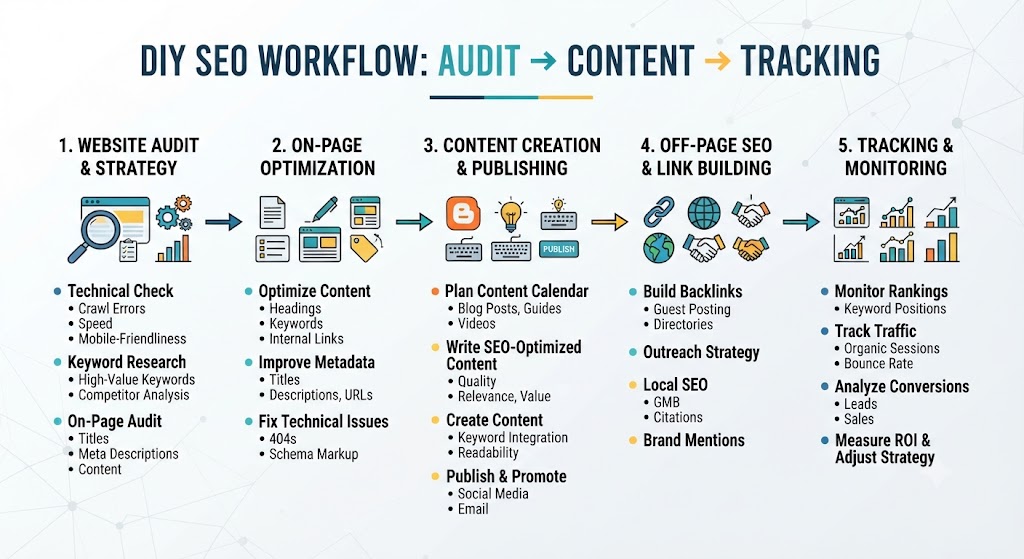
diy-seo-workflow-audit-keywords-content-analytics.webp
Alt: “DIY SEO workflow showing audit keyword research on-page content GBP and analytics” - Roadmap:
diy-seo-30-60-90-day-plan.webp
Alt: “30 60 90 day DIY SEO plan timeline for beginners and in-house teams” - Tools:
best-free-diy-seo-tools-for-beginners.webp
Alt: “Best free DIY SEO tools for beginners including audit keyword and analytics tools” - Local SEO:
google-business-profile-diy-seo-checklist.webp
Alt: “Google Business Profile checklist for DIY local SEO management” - Decision:
signs-you-need-an-seo-agency.webp
Alt: “Signs you have outgrown DIY SEO and should hire an SEO agency”
All images: WebP, compressed, lazy-loaded, descriptive filenames, correct dimensions.
Schema Markup Recommendations
Implement JSON-LD for:
- Article / BlogPosting
- FAQPage (all FAQs above)
- HowTo (30/60/90-day DIY plan or DIY process)
- ItemList (6 DIY tasks + 5 outsource tasks)
- BreadcrumbList
- Organization
- VideoObject (if embedding DIY SEO video)
Example FAQPage (abbreviated):
JSON{
  "@context": "https://schema.org",
  "@type": "FAQPage",
  "mainEntity": [
    {
      "@type": "Question",
      "name": "Can beginners do SEO themselves?",
      "acceptedAnswer": {
        "@type": "Answer",
        "text": "Yes. Beginners can handle foundational tasks like audits, keyword research, on-page improvements, content, Google Business Profile management, and analytics. Advanced technical work and link acquisition are harder to DIY well."
      }
    },
    {
      "@type": "Question",
      "name": "When should I hire someone vs. do SEO on my own?",
      "acceptedAnswer": {
        "@type": "Answer",
        "text": "Stay DIY if your site is simple, competition is moderate, and you can invest weekly time. Hire help if SEO is a major growth channel, your market is competitive, or technical and authority gaps are blocking results."
      }
    }
  ]
}
Example HowTo (abbreviated):
JSON{
  "@context": "https://schema.org",
  "@type": "HowTo",
  "name": "How to start DIY SEO in 90 days",
  "description": "A 30/60/90-day plan to run SEO yourself before deciding what to outsource.",
  "step": [
    {
      "@type": "HowToStep",
      "name": "Days 1-30 Foundation",
      "text": "Run a baseline audit, set up analytics, fix critical on-page issues, optimize GBP if local, and publish or improve priority pages."
    },
    {
      "@type": "HowToStep",
      "name": "Days 31-60 Expansion",
      "text": "Improve metadata, publish intent-matched content, strengthen internal links, and track queries and CTR weekly."
    },
    {
      "@type": "HowToStep",
      "name": "Days 61-90 Optimization",
      "text": "Refresh underperforming content, improve conversion paths, and decide which advanced tasks to outsource."
    }
  ]
}
Validate with Google’s Rich Results Test before publishing.
Final Pre-Publish SEO & UX Checklist
- Meta title ≤ 60 characters
- Meta description 150–160 characters
- One H1 with primary keyword
- Answer-first section near top
- H2/H3 hierarchy for DIY + outsource tasks
- Fixed task-count consistency (6 DIY / 5 outsource)
- All resource and help modules filled (no placeholders)
- FAQ answers complete + FAQ schema
- Tools list + 30/60/90-day plan included
- Cost/timeline and “signs to outsource” sections included
- Strong mid-content and final CTAs
- Internal links to tools, guides, and services
- Image alt text + WebP + lazy load
- Author, credentials, last updated date
- Open Graph, canonical, mobile UX, Core Web Vitals
- GA4 + CRM tracking configured
- Proofread for grammar and flow
This CMS-ready version is complete, polished, and conversion-focused. It fixes unfinished sections, answers all FAQs, clarifies DIY vs outsourcing, adds practical frameworks (tools, timelines, costs, mistakes), and installs a full lead-gen ladder — while staying trustworthy and non-pushy.
After publishing: submit the URL in Search Console, monitor queries like “can you do SEO yourself,” “DIY SEO,” and “when to hire an SEO agency,” and A/B test the free SEO score CTA against the DIY checklist offer.
Meta Title:Can You Do SEO Yourself? DIY SEO Guide + When to Outsource
Meta Description:
Yes — you can do SEO yourself. Learn 6 DIY SEO tasks, 5 to outsource, free tools, timelines, and when hiring an agency makes sense. Free SEO audit inside.
URL Suggestion: /blog/can-you-do-seo-yourself/
Focus Keyword: can you do SEO yourself
Secondary Keywords: DIY SEO, learn SEO yourself, SEO tasks to outsource, when to hire an SEO agency, DIY SEO audit, beginner SEO guide