📌 QUICK ANSWER (Format as a highlighted summary box in your CMS)
Yes, you can do SEO yourself — and many business owners do it successfully. Tasks like keyword research, on-page optimization, content creation, and setting up Google Analytics are all manageable with the right tools and a bit of consistency.
That said, more technical work — like fixing crawl errors, implementing schema markup, or building high-quality backlinks — is often better handled by an experienced SEO agency.
This guide breaks down exactly which tasks you can handle yourself, which ones to outsource, and gives you a practical 90-day plan to get started today.

📸 IMAGE SUGGESTION #1
textImage: Split-screen showing a business owner at a laptop on one side and an SEO agency team on the other
Alt text: Business owner doing DIY SEO on the left, SEO agency team on the right — comparing DIY vs. outsourced SEO
Placement: Below the quick answer box
Thinking about doing SEO yourself but not sure where to start — or whether it’s even worth the effort?
You’re not alone. SEO can feel overwhelming when you’re staring at tools, dashboards, and technical jargon for the first time. But here’s the truth: you don’t need to master all of SEO to get real results. You just need to know which parts to focus on first.
In this guide, you’ll learn:
- ✅ Which SEO tasks are genuinely beginner-friendly
- ✅ Which tasks require professional expertise
- ✅ How to build a real SEO workflow in 90 days
- ✅ When it makes financial sense to hire an agency instead
Let’s dive in.
Can You Realistically Do SEO Yourself? {#can-you-do-seo-yourself}
Yes — but with one important caveat: not all SEO is created equal.
SEO covers a wide range of disciplines, from writing and content strategy to coding and server-side performance. Some of it is genuinely accessible to non-experts. Other parts require tools, experience, and technical knowledge that take years to develop.
The good news? The areas most beginners can handle — keyword research, on-page optimization, content, local SEO, and basic analytics — are also the areas that deliver the most visible early results.
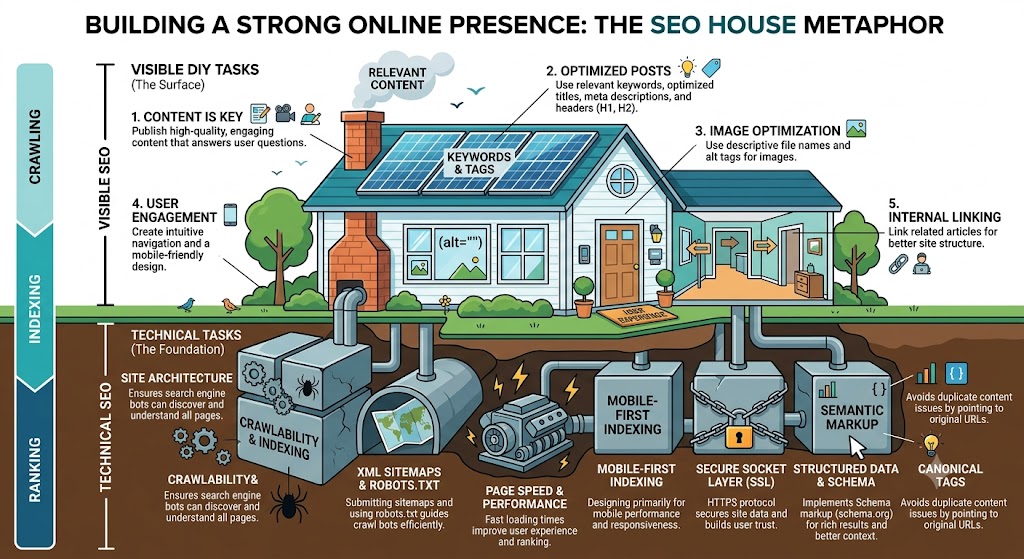
Think of DIY SEO like home improvement: you can paint rooms, install shelves, and keep up with maintenance without hiring a contractor. But when it comes to rewiring the electrical system or moving load-bearing walls, you call in a professional.
SEO works the same way.
📸 IMAGE SUGGESTION #2
textImage: Infographic showing SEO as a house — visible DIY tasks on the surface, technical tasks as the foundation
Alt text: SEO infographic showing DIY tasks like content and keywords on top, technical SEO as the foundation
Placement: After the "home improvement" analogy paragraph
Who Should Do DIY SEO (and Who Shouldn’t)? {#who-should-diy-seo}
Before investing time into DIY SEO, it helps to be honest about whether it’s the right fit for your situation.
DIY SEO is a good fit if you are:
- A local service business (plumber, dentist, realtor, restaurant, etc.)
- Running a small-to-medium website (under 500 pages)
- On a limited budget and need results before investing in an agency
- Willing to commit 3–5 hours per week consistently
- A solopreneur or startup building organic visibility from scratch
- Someone who wants to understand SEO before managing an agency
DIY SEO may not be enough if you are:
- Running an e-commerce site with thousands of product pages
- In a highly competitive niche (legal, finance, insurance, medical)
- Experiencing technical issues like indexing problems or manual penalties
- Planning a site migration or major redesign
- Needing fast results in a short timeline
- Struggling to build backlinks in a link-saturated industry
The hybrid approach (best of both worlds)
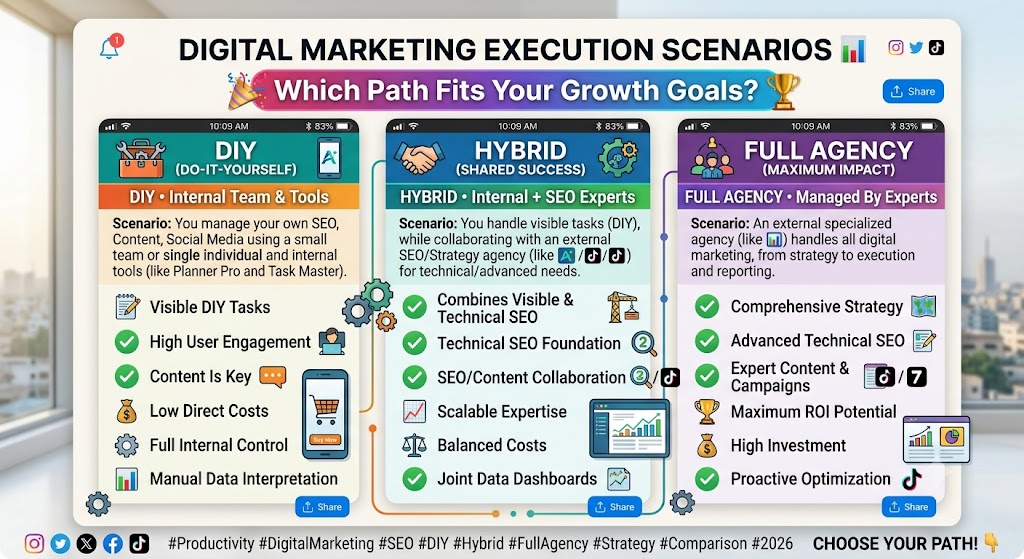
Many businesses find that a hybrid model works best: handle content, keyword research, and GBP in-house while partnering with an agency for technical SEO, link building, and ongoing strategy. This keeps costs lower while ensuring the complex work is done right.
📸 IMAGE SUGGESTION #3
textImage: Three-column graphic — DIY, Hybrid, Full Agency — with checkmarks for each scenario
Alt text: Decision chart showing when to do DIY SEO, use a hybrid approach, or hire a full SEO agency
Placement: After the hybrid section
DIY SEO vs. Outsourced SEO: Quick Reference {#diy-vs-outsource}
(Format as a styled comparison table in your CMS)
| SEO Task | DIY | Outsource | Notes |
|---|---|---|---|
| Initial SEO Audit | ✅ | Use free tools to start | |
| Keyword Research | ✅ | Free tools available | |
| On-Page Optimization | ✅ | Title tags, headers, meta | |
| Content Creation | ✅ | Blog posts, service pages | |
| Google Business Profile | ✅ | High local SEO impact | |
| Basic Analytics Setup | ✅ | GSC + GA4 are free | |
| Internal Linking | ✅ | Often overlooked by DIYers | |
| Technical SEO Audits | ✅ | Requires advanced tools | |
| Link Building & Outreach | ✅ | Time-intensive, high risk if done wrong | |
| Core Web Vitals Optimization | ✅ | Requires developer expertise | |
| Schema Markup Implementation | ✅ | JSON-LD coding required | |
| Site Architecture & Crawl Fixes | ✅ | Complex without experience | |
| Ongoing Strategy & Competitor Analysis | ✅ | Needs continuous monitoring |
🔗 INTERNAL LINK SUGGESTION:
“Wondering what professional SEO costs? See our [SEO Pricing Guide] to understand agency investment levels.”
6 SEO Tasks You Can Do Yourself (Step-by-Step) {#diy-seo-tasks}
Here are six high-impact SEO tasks you can start tackling today — no agency required.
1. Conduct an Initial SEO Audit
Before you optimize anything, you need to understand where your website stands right now. An SEO audit gives you a baseline — your current scores, top issues, and what to fix first.
What to look for in an audit:
- Broken links (4XX errors)
- Missing or duplicate title tags and meta descriptions
- Pages not indexed by Google
- Mobile usability issues
- Slow page load times
- Missing image alt text
- Thin or duplicate content
How to DIY your SEO audit:
- Run your site through a free tool like SEO Checker, Ahrefs Webmaster Tools, or Semrush’s Site Audit (limited free version)
- Review the flagged issues and sort by severity
- Fix high-priority issues first — typically indexing, broken links, and missing metadata
- Use Google Search Console → Coverage Report to find crawl/indexing issues
- Submit your XML sitemap in GSC if you haven’t already
✅ Pro tip: Document your baseline scores before making changes. This makes it easy to measure progress over time.

📸 IMAGE SUGGESTION #4
textImage: Screenshot mockup of Google Search Console Coverage Report with errors highlighted
Alt text: Google Search Console coverage report showing indexed and error pages for DIY SEO audit
Placement: Within the audit section
🔗 INTERNAL LINK SUGGESTION:
Link “SEO audit” to your dedicated SEO audit guide or service page
2. Research Your Target Keywords
Keyword research is the foundation of every successful SEO strategy. It tells you exactly what your audience is searching for, so you can create content that ranks for those searches and attracts the right visitors.
What makes a good keyword target:
- Relevant — matches what your business offers
- Searchable — enough people are actively looking for it
- Realistic — low enough competition for your site to rank
- Aligned with intent — matches what the searcher actually wants
How to do keyword research yourself:
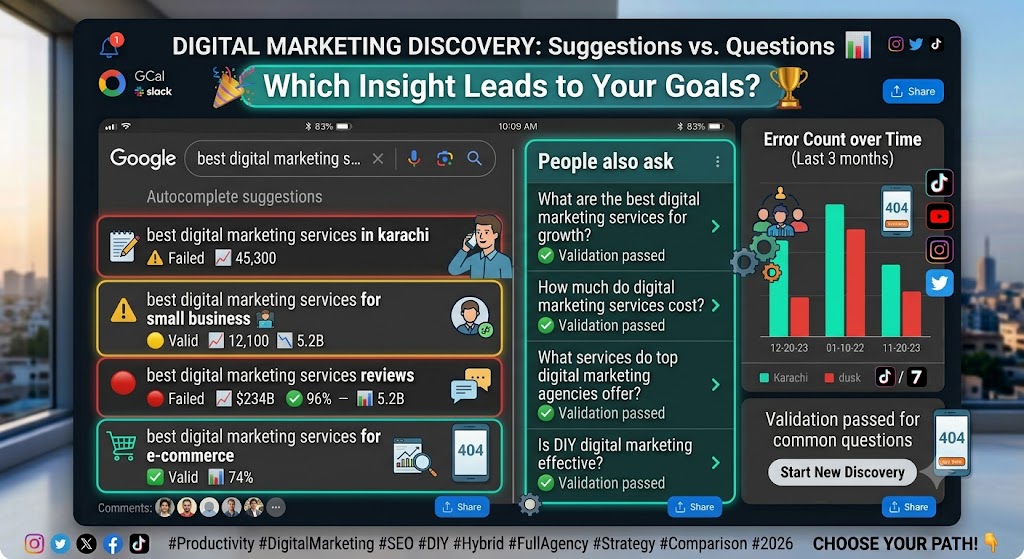
- Start with Google Autocomplete — type your main topic and note the suggestions
- Check “People Also Ask” boxes on Google results pages for question-based keywords
- Use Google Keyword Planner (free) or KeywordsFX to find volume data
- Look for long-tail keywords (3–5 word phrases) — easier to rank and higher intent
- Group keywords by topic/theme, not just individual terms
- Map one primary keyword + 2–3 secondary keywords to each page
Example:
- Primary: “emergency plumber Chicago”
- Secondary: “24-hour plumber Chicago,” “Chicago plumbing emergency,” “burst pipe repair Chicago”
📸 IMAGE SUGGESTION #5
textImage: Side-by-side screenshot of Google Autocomplete suggestions and People Also Ask for a sample keyword
Alt text: Google autocomplete and People Also Ask results showing DIY keyword research in action
Placement: Within keyword research section
🔗 INTERNAL LINK SUGGESTION:
Link “keyword research” to your dedicated keyword research guide
3. Optimize Your On-Page SEO
On-page SEO is about making sure Google (and your visitors) can clearly understand what each page on your site is about. Done right, it improves both your search rankings and your user experience.
The core on-page elements to optimize:
| Element | Best Practice |
|---|---|
| Title Tag | Include primary keyword near the front. Keep under 60 characters. |
| Meta Description | Write a compelling 150-character summary. Include keyword naturally. |
| H1 Heading | Use once per page. Include primary keyword. Match search intent. |
| H2 / H3 Headings | Use to organize sections. Include secondary keywords where natural. |
| Body Content | Use primary keyword in first 100 words. Avoid keyword stuffing. |
| Image Alt Text | Describe the image clearly. Include keyword where relevant. |
| URL Slug | Short, descriptive, hyphenated. Example: /diy-seo-guide |
| Internal Links | Link to related pages with descriptive anchor text |
How to do on-page optimization yourself:
- Identify the primary keyword for each page
- Rewrite title tags and meta descriptions if they’re missing or generic
- Check that your H1 is clear, unique, and keyword-rich
- Review your body content — is the keyword present naturally in the first paragraph?
- Add descriptive alt text to every image
- Clean up your URL slugs if they contain numbers or irrelevant characters
- Add internal links to related service pages or blog posts

📸 IMAGE SUGGESTION #6
textImage: Annotated screenshot of a web page showing title tag, H1, meta description, and alt text labeled
Alt text: On-page SEO elements annotated on a sample webpage — title tag, H1, meta description, and alt text
Placement: Within on-page optimization section
🔗 INTERNAL LINK SUGGESTION:
Link “title tags” and “meta descriptions” to your on-page SEO guide
4. Create SEO-Friendly Content
Content is one of the most powerful levers in DIY SEO — and it’s one area where you have a genuine advantage over any agency. You know your customers, your industry, and your brand voice better than anyone else.
Consistent, high-quality content helps you:
- Rank for more keywords over time
- Answer the questions your customers are already asking
- Build trust and authority in your niche
- Drive organic traffic without paying for ads
How to create SEO-friendly content yourself:
- Start with your customer’s questions — what do they ask before buying? What confuses them?
- Search your target keyword and review the top-ranking pages — what topics do they all cover?
- Identify gaps — what important information are they missing? Cover it in your piece.
- Write for the user first, search engine second — if your content is genuinely useful, rankings follow
- Structure for scannability — use H2/H3 headings, bullet points, numbered lists, and short paragraphs
- Include a clear call to action on every page — don’t leave readers with no next step
- Publish consistently — even one well-optimized post per month compounds over time
Content types that work well for DIY SEO:
- Blog posts answering common questions
- How-to guides and tutorials
- Comparison pages (“X vs Y”)
- Local landing pages
- FAQ pages
- Case studies and examples
🔗 INTERNAL LINK SUGGESTION:
Link “content creation” to your content writing service page or content marketing guide
5. Manage Your Google Business Profile
If your business serves local customers, your Google Business Profile (GBP) is one of the highest-impact SEO assets you own — and it’s completely free to manage.
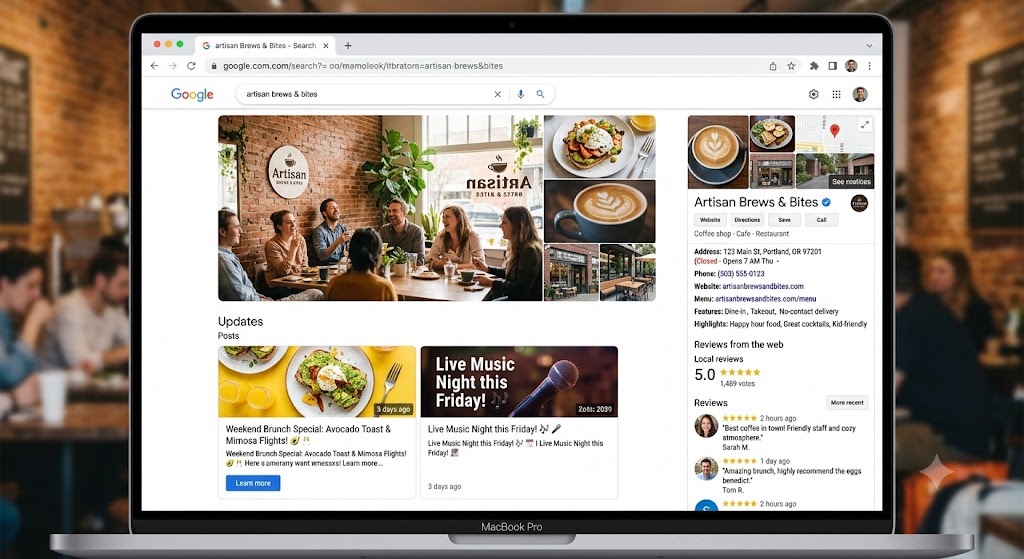
A well-optimized GBP helps your business appear in:
- Google’s Local Pack (the map results at the top of local searches)
- Google Maps searches
- “Near me” and location-based queries
How to manage your Google Business Profile yourself:
- Claim and verify your listing at business.google.com if you haven’t already
- Complete every field — name, address, phone, hours, website, services, description
- Choose the right primary and secondary categories — these directly impact what searches you appear for
- Add high-quality photos regularly — interior, exterior, team, products/services
- Post weekly updates — promotions, news, events, tips
- Respond to every review — positive and negative — within 24–48 hours
- Add your products or services with descriptions and prices where applicable
- Enable messaging if you can respond promptly
✅ Pro tip: Use keywords naturally in your GBP description and post content. Google reads these.
📸 IMAGE SUGGESTION #7
textImage: Screenshot mockup of a fully optimized Google Business Profile listing with photos, reviews, and posts
Alt text: Example of a fully optimized Google Business Profile for local SEO
Placement: Within GBP section
🔗 INTERNAL LINK SUGGESTION:
Link “Google Business Profile” to your local SEO guide or GBP optimization service page
6. Set Up and Monitor Basic Analytics
You can’t improve what you don’t measure. Setting up basic analytics gives you the data to understand what’s working, catch problems early, and make smarter decisions about where to focus your SEO efforts.
The two essential free tools every website needs:
Google Search Console (GSC)
- Shows which keywords bring people to your site
- Alerts you to indexing problems, crawl errors, and manual penalties
- Lets you submit sitemaps and inspect individual URLs
- Tracks your average position, clicks, and impressions in Google
Google Analytics 4 (GA4)
- Shows how people behave on your site after they arrive
- Tracks sessions, bounce rate, time on page, and conversions
- Helps you identify your highest-traffic and highest-converting pages
- Tracks traffic sources (organic, direct, social, paid)
How to set up basic analytics yourself:
- Create a free Google Search Console account and verify your site
- Submit your XML sitemap (usually yoursite.com/sitemap.xml)
- Create a free Google Analytics 4 account and install the tracking code (or use a plugin like GA4 for WordPress)
- Link GSC and GA4 together for richer reporting
- Set up a weekly 15-minute check-in to review:
- Top queries in GSC
- Clicks and impressions trends
- Any new crawl errors or coverage issues
- Top pages by traffic in GA4

📸 IMAGE SUGGESTION #8
textImage: Side-by-side screenshot mockups of Google Search Console and GA4 dashboard
Alt text: Google Search Console and Google Analytics 4 dashboards for monitoring DIY SEO performance
Placement: Within analytics section
🔗 INTERNAL LINK SUGGESTION:
Link “Google Search Console” and “Google Analytics” to your GSC setup guide and GA4 guide
🔶 MID-PAGE LEAD GEN CTA — FORMAT AS HIGHLIGHTED BOX
🎯 Not Sure Where to Start?
Download our free DIY SEO Starter Checklist — a step-by-step PDF covering everything above, with space to track your progress.
[Download the Free Checklist →] (link to lead capture landing page)
5 SEO Tasks You Should Outsource to an Agency {#outsource-seo-tasks}
These five areas require deeper technical expertise, advanced tools, or time-intensive effort that rarely pays off when managed in-house without experience.
1. Technical SEO Audits
Technical SEO covers everything that affects how search engines crawl, index, and render your website. While you can perform a surface-level audit yourself, a professional technical audit digs deeper into areas like:
- Crawl budget issues on large sites
- JavaScript rendering problems
- Duplicate content caused by URL parameters
- Redirect chains and loops
- Hreflang errors for multilingual sites
- Canonicalization issues
- Log file analysis
Why outsource: Technical SEO issues can silently suppress your rankings for months without obvious symptoms. Experienced SEO professionals use advanced tools and know exactly where to look — and how to fix issues without breaking your site.
🔗 INTERNAL LINK SUGGESTION:
Link “technical SEO” to your technical SEO service page
2. Link Building and Outreach
Backlinks remain one of Google’s most important ranking signals. But building quality links — the kind that actually move rankings — takes time, strategy, relationships, and a clear understanding of what Google considers acceptable.
Link building involves:
- Identifying relevant, authoritative sites in your industry
- Crafting personalized outreach emails
- Creating linkable assets (data studies, original research, tools)
- Building relationships with editors and publishers
- Guest posting and digital PR
- Recovering toxic links
Why outsource: Poor link building can result in Google penalties that are difficult and expensive to recover from. Agencies have established relationships, proven track records, and the experience to scale outreach without putting your site at risk.
🔗 INTERNAL LINK SUGGESTION:
Link “link building” to your link building or content marketing service page
3. Page Speed and Core Web Vitals Optimization
Google uses Core Web Vitals — LCP (Largest Contentful Paint), INP (Interaction to Next Paint), and CLS (Cumulative Layout Shift) — as direct ranking factors. Improving these scores often requires changes that go beyond SEO:
- Compressing and converting images to next-gen formats
- Implementing lazy loading
- Minifying CSS, JavaScript, and HTML
- Configuring server-side caching and CDN
- Eliminating render-blocking resources
- Fixing cumulative layout shift caused by dynamic elements
Why outsource: Without development experience, performance optimizations can break functionality or design. Agencies have developers on staff who can improve your scores safely and keep them optimized as your site evolves.
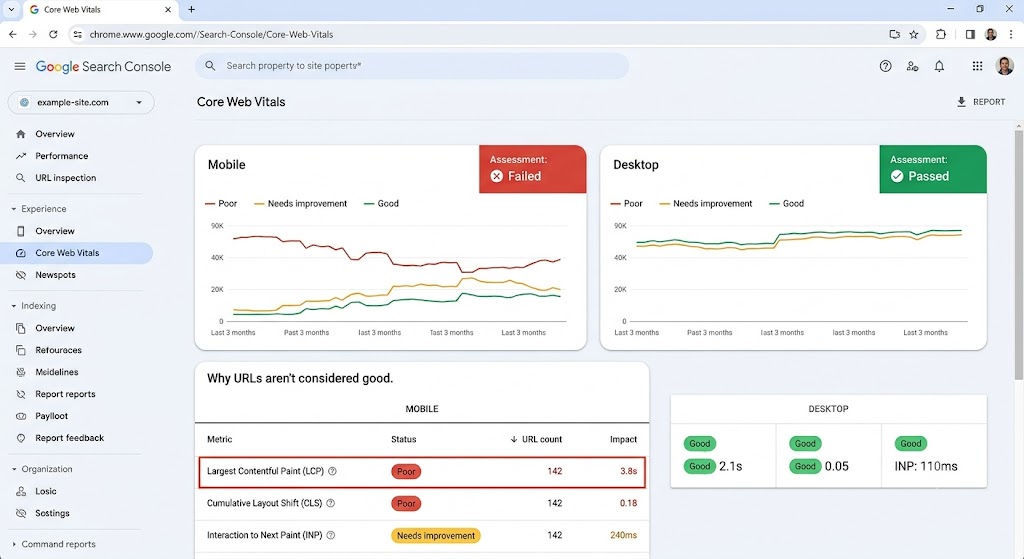
📸 IMAGE SUGGESTION #9
textImage: Screenshot of Core Web Vitals scores in Google Search Console showing pass/fail metrics
Alt text: Google Search Console Core Web Vitals report showing LCP, INP, and CLS scores
Placement: Within the Core Web Vitals section
4. Structured Data (Schema Markup)
Schema markup is code added to your pages that helps search engines understand your content in greater detail. Done correctly, it can unlock rich results in Google — star ratings, FAQ dropdowns, product prices, event details, and more.
Schema requires:
- Writing or generating valid JSON-LD code
- Choosing the correct schema type for each page
- Validating markup with Google’s Rich Results Test
- Keeping it updated when page content changes
Why outsource: A single error in your schema markup can prevent rich results from showing — or worse, trigger a manual action. Agencies implement schema correctly the first time and ensure it remains valid as Google’s requirements evolve.
🔗 INTERNAL LINK SUGGESTION:
Link “schema markup” to your technical SEO or structured data service page
5. Ongoing SEO Strategy and Competitor Analysis
SEO is not a one-time project. Rankings shift, competitors update their content, Google rolls out algorithm updates, and new keyword opportunities emerge constantly. Maintaining a competitive SEO strategy over time requires:
- Regular keyword gap and opportunity analysis
- Ongoing competitor tracking
- Content refresh cycles for underperforming pages
- Algorithm update monitoring and response
- Strategic planning tied to business goals
- Monthly reporting and ROI analysis
Why outsource: An experienced SEO agency brings an outside perspective, dedicated tools, and an up-to-date understanding of algorithm changes that in-house teams often miss. They keep your strategy moving forward even when your team is focused on day-to-day operations.
🔷 EXPERT INSIGHT PULL QUOTE — FORMAT AS STYLED QUOTE BLOCK
“Working with an SEO agency saves you time, and you get to work with a team of people who have already tackled whatever digital challenges you’re facing. They’ve seen what works, what doesn’t, and know exactly what to expect.”
— Trevin Shirey, VP of Marketing
🔗 INTERNAL LINK SUGGESTION:
Link “SEO strategy” to your SEO services overview page
Your 90-Day DIY SEO Plan {#90-day-seo-plan}
(Format as a styled timeline or tabbed section in your CMS)
One of the biggest reasons DIY SEO fails isn’t lack of knowledge — it’s lack of structure. This 90-day plan gives you a clear sequence to follow so you’re building on each step instead of jumping around randomly.
Days 1–14: Baseline and Setup
Goal: Understand where you are and set up your measurement infrastructure.
- Run an initial SEO audit with SEO Checker or Ahrefs Webmaster Tools
- Set up Google Search Console and verify your site
- Set up Google Analytics 4 and link it to GSC
- Submit your XML sitemap to GSC
- Check the Coverage Report for indexing errors
- Review your robots.txt file — make sure key pages aren’t blocked
- Document your baseline: rankings, traffic, clicks, impressions
- Claim and verify your Google Business Profile if not already done
Days 15–30: Keyword Research and On-Page Fixes
Goal: Identify your best keyword opportunities and fix your most important pages.
- Use Google Keyword Planner, Autocomplete, and PAA to build a keyword list
- Map one primary keyword per page for your top 10–15 most important pages
- Rewrite title tags and meta descriptions for any that are missing, duplicated, or generic
- Review H1s — make sure each page has one unique, keyword-rich H1
- Fix any broken links found during the audit
- Add alt text to any images missing it
- Clean up messy URL slugs where possible (with proper 301 redirects)
Days 31–60: Content and Local SEO
Goal: Start building new content and strengthen your local presence.
- Write and publish 2–4 new blog posts targeting researched keywords
- Update or expand any existing blog posts that are thin or outdated
- Add internal links between new and existing content using descriptive anchors
- Fully optimize your Google Business Profile (categories, photos, description, services)
- Publish your first GBP post and set a weekly posting schedule
- Respond to any existing reviews on GBP
- Create or optimize a local service area page if you serve specific locations
Days 61–90: Measure, Refine, and Decide
Goal: Review your data, double down on what’s working, and identify where professional help would accelerate growth.
- Review GSC — which queries are gaining impressions and clicks?
- Review GA4 — which pages are getting the most traffic and converting?
- Identify 3–5 pages that are ranking on page 2 or 3 (positions 11–30) and optimize them for a rankings push
- Refresh underperforming content — add more depth, better structure, or updated information
- Review competitor content for topics you haven’t covered yet
- Assess whether technical SEO, link building, or ongoing strategy would benefit from agency support

📸 IMAGE SUGGESTION #10
textImage: Visual timeline infographic showing the 90-day DIY SEO plan across three phases
Alt text: 90-day DIY SEO plan infographic showing setup, optimization, and measurement phases
Placement: Above or within the 90-day section
🔶 CTA BLOCK — FORMAT AS HIGHLIGHTED BOX
📅 Want a Head Start on Your 90-Day Plan?
Get a free, personalized SEO audit of your website — we’ll show you exactly where to focus first.
[Get My Free SEO Audit →] (link to free audit landing page or contact form)
Best Free and Paid SEO Tools for Beginners {#seo-tools}
(Format as a styled tools table or card grid in your CMS)
You don’t need to spend a fortune on SEO tools to get started. Here are the most useful options at every budget level.
Free SEO Tools
| Tool | Best For |
|---|---|
| Google Search Console | Indexing, keyword performance, crawl errors |
| Google Analytics 4 | Traffic, behavior, conversions |
| Google Keyword Planner | Keyword volume and competition |
| Google Business Profile | Local SEO management |
| Ahrefs Webmaster Tools | Backlink data + basic site audit (free for your own site) |
| Yoast SEO / Rank Math | WordPress on-page optimization |
| PageSpeed Insights | Core Web Vitals and performance scoring |
| Rich Results Test | Schema markup validation |
| Screaming Frog | Site crawling (free up to 500 URLs) |
Paid SEO Tools Worth Considering
| Tool | Starting Price | Best For |
|---|---|---|
| Semrush | ~$139/mo | All-in-one SEO suite |
| Ahrefs | ~$129/mo | Backlink analysis + keyword research |
| Moz Pro | ~$99/mo | Beginner-friendly SEO suite |
| Surfer SEO | ~$89/mo | AI-assisted content optimization |
| KeywordsFX | Included with WebFX | Keyword research with lead intelligence |
✅ Recommendation for most small businesses: Start with the free tools — Google Search Console, GA4, and Ahrefs Webmaster Tools. You can get a long way before needing a paid platform.
Common DIY SEO Mistakes to Avoid {#seo-mistakes}
Even well-intentioned SEO efforts can backfire if you fall into these common traps.
1. Targeting Keywords That Are Too Competitive
Beginners often go after high-volume head terms like “best running shoes” instead of more achievable long-tail terms like “best trail running shoes for flat feet.” Start with lower-competition keywords and build authority over time.
2. Ignoring Search Intent
A keyword doesn’t tell the full story. “SEO tools” could be someone wanting a list, a comparison, a free option, or a tutorial. If your content doesn’t match what the searcher actually wants, you won’t rank — even with the right keyword.
3. Publishing Content Without Internal Links
Every new page you publish should link to existing relevant pages — and existing pages should link back to it where appropriate. Without internal links, new content is harder for Google to discover and understand.
4. Expecting Results in Weeks
SEO is a long game. Most new content takes 3–6 months to rank meaningfully in competitive niches. Don’t abandon your strategy because you haven’t seen a spike in 30 days. Consistency is the real competitive advantage.
5. Stuffing Keywords Instead of Writing Naturally
Overusing your target keyword makes content harder to read and can trigger Google’s spam filters. Write naturally, cover the topic thoroughly, and let keywords appear organically.
6. Skipping Technical Basics
You don’t need to be a developer to check that your sitemap is submitted, your key pages are indexed, and your site loads reasonably fast. Skipping these basics can quietly suppress your rankings for months.
7. Buying Cheap Backlinks
Purchasing links from low-quality directories or link farms might seem like a shortcut, but it can trigger a Google penalty that tanks your rankings and is very difficult to recover from. Build links the right way or leave it to professionals.
8. Measuring Traffic But Not Leads or Conversions
Traffic is a vanity metric if it doesn’t lead to calls, form fills, or purchases. Set up goal tracking in GA4 so you know which SEO efforts are actually generating business.
Frequently Asked Questions {#faq}
(Implement as an FAQ accordion in your CMS and add FAQPage schema — see schema section below)
How long does DIY SEO take to work?
DIY SEO typically takes 3–6 months to show meaningful results, depending on your industry, competition level, and how consistently you’re publishing and optimizing content. Local SEO improvements — especially through Google Business Profile — can sometimes show faster results, within 30–60 days.
Can a small business do SEO without an agency?
Yes, absolutely. Many small businesses successfully handle foundational SEO in-house — particularly local businesses with a defined service area. Focus on Google Business Profile, keyword-optimized service pages, and regular blog content. For competitive markets or technical challenges, consider a hybrid approach.
What are the best free SEO tools for beginners?
The most important free tools are Google Search Console (for indexing and keyword performance), Google Analytics 4 (for traffic and behavior data), and Ahrefs Webmaster Tools (for backlink and crawl data). These three alone give you more SEO insight than most businesses ever use.
Is DIY SEO enough for a local business?
For most local service businesses — plumbers, dentists, lawyers, restaurants, contractors — DIY SEO is enough to establish solid local visibility. Consistent GBP management, location-targeted content, and on-page optimization will cover the majority of your needs.
When should I hire an SEO agency?
Consider hiring an SEO agency when: you’ve maxed out the DIY basics but rankings have plateaued; your site has technical issues you can’t diagnose or fix; you need link building at scale; you’re planning a site migration; or you’re in a highly competitive market where expert strategy is required to break through.
How much does DIY SEO cost?
The biggest cost of DIY SEO is time, not money. The core tools (GSC, GA4, Ahrefs Webmaster Tools) are free. If you invest in a paid tool like Semrush or Ahrefs, budget $99–$139/month. Compare that to professional SEO services, which typically range from $1,500–$5,000+ per month depending on scope.
What’s the difference between on-page SEO and technical SEO?
On-page SEO refers to content-level optimizations you can see and edit — title tags, headers, keywords, meta descriptions, and internal links. Technical SEO refers to behind-the-scenes factors that affect how search engines crawl and index your site — speed, schema, site structure, canonicals, and more. On-page SEO is generally DIY-friendly; technical SEO usually benefits from professional expertise.
Next Steps: Start Your DIY SEO Journey Today {#next-steps}
You now have everything you need to start making meaningful SEO progress on your own.
Here’s a quick recap of your action plan:
- Run a free SEO audit to see where your site stands today
- Set up Google Search Console and GA4 if you haven’t already
- Research and map keywords to your most important pages
- Optimize title tags, H1s, and meta descriptions across your top pages
- Create a content plan based on the questions your customers are asking
- Manage and optimize your Google Business Profile for local visibility
- Follow the 90-day plan to build momentum step by step
And when you’re ready to go further?
Some parts of SEO — technical audits, link building, schema, and ongoing strategy — deliver better results faster with expert support. Whether you want to hand off the complex work or get a second opinion on your current efforts, we’re here to help.
🔶 BOTTOM-OF-PAGE CTA — FORMAT AS BOLD CTA SECTION
🚀 Ready to Accelerate Your SEO Results?
Whether you’re just getting started or ready to bring in professional support, we offer a free, no-obligation SEO audit that shows you exactly where your site stands and what to prioritize.
[Get My Free SEO Audit →]
(link to free audit landing page or contact form)
Or, [talk to an SEO strategist →] to explore whether a managed SEO plan is the right fit for your business.
🏷️ SCHEMA MARKUP
(Add via JSON-LD in your CMS’s header/footer script injection or SEO plugin)
Schema 1: Article / BlogPosting
JSON{
  "@context": "https://schema.org",
  "@type": "BlogPosting",
  "headline": "Can You Do SEO Yourself? Yes — Here's What to DIY and What to Outsource",
  "description": "Yes, you can do SEO yourself. Learn which SEO tasks to DIY — keyword research, on-page SEO, content, analytics — and which ones to outsource. Includes a 90-day beginner plan.",
  "image": "https://yourwebsite.com/images/diy-seo-guide-beginners.jpg",
  "author": {
    "@type": "Person",
    "name": "Emily Carter",
    "jobTitle": "Sr. Content Team Lead",
    "url": "https://yourwebsite.com/author/emily-carter"
  },
  "publisher": {
    "@type": "Organization",
    "name": "Your Company Name",
    "logo": {
      "@type": "ImageObject",
      "url": "https://yourwebsite.com/logo.png"
    }
  },
  "datePublished": "2025-10-17",
  "dateModified": "2025-10-17",
  "mainEntityOfPage": {
    "@type": "WebPage",
    "@id": "https://yourwebsite.com/blog/can-you-do-seo-yourself"
  }
}
Schema 2: FAQPage
JSON{
  "@context": "https://schema.org",
  "@type": "FAQPage",
  "mainEntity": [
    {
      "@type": "Question",
      "name": "How long does DIY SEO take to work?",
      "acceptedAnswer": {
        "@type": "Answer",
        "text": "DIY SEO typically takes 3–6 months to show meaningful results, depending on your industry, competition level, and consistency. Local SEO improvements can sometimes show results within 30–60 days."
      }
    },
    {
      "@type": "Question",
      "name": "Can a small business do SEO without an agency?",
      "acceptedAnswer": {
        "@type": "Answer",
        "text": "Yes. Many small businesses handle foundational SEO in-house — especially local businesses. Focus on Google Business Profile, keyword-optimized service pages, and regular blog content."
      }
    },
    {
      "@type": "Question",
      "name": "What are the best free SEO tools for beginners?",
      "acceptedAnswer": {
        "@type": "Answer",
        "text": "The most important free tools are Google Search Console, Google Analytics 4, and Ahrefs Webmaster Tools. These three give you more SEO insight than most businesses ever use."
      }
    },
    {
      "@type": "Question",
      "name": "When should I hire an SEO agency?",
      "acceptedAnswer": {
        "@type": "Answer",
        "text": "Consider hiring an SEO agency when you've maxed out DIY basics, your site has technical issues you can't fix, you need link building at scale, or you're in a highly competitive market."
      }
    },
    {
      "@type": "Question",
      "name": "How much does DIY SEO cost?",
      "acceptedAnswer": {
        "@type": "Answer",
        "text": "The biggest cost of DIY SEO is time, not money. Core tools like GSC, GA4, and Ahrefs Webmaster Tools are free. Paid tools range from $99–$139/month. Professional SEO services typically run $1,500–$5,000+ per month."
      }
    },
    {
      "@type": "Question",
      "name": "What is the difference between on-page SEO and technical SEO?",
      "acceptedAnswer": {
        "@type": "Answer",
        "text": "On-page SEO refers to content-level optimizations like title tags, headers, and keywords. Technical SEO covers behind-the-scenes factors like site speed, schema, and crawlability. On-page SEO is DIY-friendly; technical SEO usually benefits from professional expertise."
      }
    }
  ]
}
Schema 3: BreadcrumbList
JSON{
  "@context": "https://schema.org",
  "@type": "BreadcrumbList",
  "itemListElement": [
    {
      "@type": "ListItem",
      "position": 1,
      "name": "Home",
      "item": "https://yourwebsite.com"
    },
    {
      "@type": "ListItem",
      "position": 2,
      "name": "Blog",
      "item": "https://yourwebsite.com/blog"
    },
    {
      "@type": "ListItem",
      "position": 3,
      "name": "Can You Do SEO Yourself?",
      "item": "https://yourwebsite.com/blog/can-you-do-seo-yourself"
    }
  ]
}
Schema 4: Organization (site-level — add to all pages or via CMS global settings)
JSON{
  "@context": "https://schema.org",
  "@type": "Organization",
  "name": "Your Company Name",
  "url": "https://yourwebsite.com",
  "logo": "https://yourwebsite.com/logo.png",
  "contactPoint": {
    "@type": "ContactPoint",
    "telephone": "+1-XXX-XXX-XXXX",
    "contactType": "customer service"
  },
  "sameAs": [
    "https://www.linkedin.com/company/yourcompany",
    "https://twitter.com/yourcompany",
    "https://www.facebook.com/yourcompany"
  ]
}
📌 FINAL CMS PUBLISHING CHECKLIST
(Run through before hitting Publish)
Content
- H1 is unique, keyword-rich, and matches search intent
- All H2s and H3s are properly nested and logical
- Primary keyword appears in first 100 words
- Keywords used naturally throughout — no stuffing
- FAQ section added and formatted as accordion
- Table of contents with anchor links functional
- All CTAs present: top (lead magnet), mid-page (audit), bottom (consult)
- Author bio and reviewer credit displayed
- Published and Last Updated dates visible
- “7 tasks” (or correct number) consistent throughout
Technical On-Page
- Meta title set (under 60 characters)
- Meta description set (145–155 characters)
- URL slug clean and correct
- Canonical URL set
- OG title and description set for social sharing
- Featured image uploaded with correct file name and alt text
- All body images have descriptive alt text
- Internal links added to all recommended pages
- External links (tools, resources) open in new tab and are relevant
- All anchor text is descriptive — no “click here”
Schema
- BlogPosting schema added and validated
- FAQPage schema added and validated
- BreadcrumbList schema added
- Organization schema present site-wide
- Validated with Google’s Rich Results Test before publishing
Performance
- Featured image compressed (WebP preferred, under 100KB)
- All inline images compressed
- Video embed set to lazy-load or click-to-play
- No render-blocking scripts added by this post
- Mobile preview checked in CMS
Lead Generation
- Top CTA linked to checklist/lead magnet download page
- Mid-page CTA linked to free audit page
- Bottom CTA linked to contact/strategy call page
- All CTA buttons have tracking events in GA4
- Lead magnet PDF (DIY SEO Checklist) created and hosted
💡 Post-Publish Actions:
- Submit URL in Google Search Console → URL Inspection → Request Indexing
- Share on LinkedIn, social, and email list
- Add internal links to this post from 3–5 existing related blog posts
- Schedule a content refresh reminder for 6 months out
- Monitor GSC impressions/clicks for this URL weekly for the first 30 days
This is your fully CMS-ready, publication-standard version. Every section is structured for both reader experience and search engine performance, with clear lead generation paths built throughout. Replace all bracketed placeholders [like this] with your actual URLs, company name, and tracking links before publishing.