[Author Name] | Senior Web Developer at WebFX Last Updated: July 1, 2026 | Reading Time: 18 min
📥 [CTA — Lead Magnet, Top of Page]Download the complete glossary as a free PDF — print it, share it with your team, and reference it anytime you’re reviewing a proposal or briefing a developer. [Download Free Glossary PDF →]
Why Understanding Web Development Terms Matters for Your Business
Web development is an expansive, technical field. 5This comprehensive guide gives you all the information you need to confidently manage successful websites.
Whether you’re a business owner reviewing a website redesign proposal, a marketer collaborating with a dev team, or a founder evaluating an agency, the terminology can be a barrier. 5Knowing these terms is useful beyond definitions. It makes it easier to read proposals with confidence, understand what vendors are promising, and keep project conversations focused on business goals instead of getting lost in technical jargon.
This glossary solves that problem. Every term below follows a consistent format: what it is → why it matters → a real-world example — so you don’t just memorize vocabulary, you understand how to use it.
This guide is built for:
Business owners and executives evaluating web projects
Marketers and content managers working alongside developers
Project managers bridging technical and non-technical stakeholders
Beginner developers building foundational knowledge
How to use this page:
Use the A–Z jump navigation below to find a specific term instantly
Browse by category if you’re exploring a topic area
Each term links to a deeper WebFX guide where one exists
A–Z Jump Navigation
[Sticky anchor bar — implement as fixed element at top of content area]
What it is: The practice of designing and building websites that can be used by everyone, including people with disabilities such as visual, auditory, motor, or cognitive impairments.
Why it matters: Accessible websites reach a wider audience, comply with legal requirements (like ADA and WCAG 2.2), and often perform better in search rankings because accessible markup aligns with SEO best practices.
Example: Adding alt text to images, ensuring keyboard navigation works on all interactive elements, and maintaining a minimum color contrast ratio of 4.5:1.
🔗 Internal Link: [Learn about WebFX’s ADA compliance services →]
Adaptive Design
What it is: A web design approach that creates multiple fixed layouts, each tailored to a specific screen size or device category.
Why it matters: Unlike responsive design (which fluidly adjusts), adaptive design serves a pre-built layout optimized for each breakpoint, which can provide more control over the user experience on specific devices.
Example: A website that has entirely different layouts for mobile (375px), tablet (768px), and desktop (1440px) rather than one fluid grid.
Algorithm
What it is: A defined set of step-by-step instructions for solving a problem or completing a task.
Why it matters: Algorithms power everything from Google’s search rankings to a website’s product recommendation engine. Understanding that algorithms follow rules helps demystify why changes to your site can affect search visibility.
Example: Google’s ranking algorithm evaluates hundreds of factors — content relevance, backlinks, page speed, user experience — to determine where your page appears in search results.
API (Application Programming Interface)
What it is: A set of rules and protocols that allow different software applications to communicate with each other and share data.
Why it matters:10Think of an API as the messenger between different software programs. It allows two applications to talk to each other and share information seamlessly. For example, when your online store connects with a payment processor like PayPal or Stripe, an API makes that transaction possible.
Example: Embedding Google Maps on your contact page, connecting your CMS to an email marketing platform, or syncing inventory data between your website and point-of-sale system.
🔗 Internal Link: [Explore WebFX’s web application development services →]
[H3] Application (App)
What it is: A software program designed to perform a specific set of tasks for the user, whether on a mobile device, desktop, or within a web browser.
Why it matters: Understanding the distinction between native apps, web apps, and progressive web apps (PWAs) helps you make informed decisions about how to reach your audience.
Example: Gmail (web app), Instagram (native mobile app), or Starbucks’ order-ahead system (PWA).
Attribute
What it is: Additional information added to an HTML element that modifies its behavior, appearance, or provides metadata.
Why it matters: Attributes control critical functions like linking (href), image display (src, alt), form behavior (type, required), and accessibility (aria-label).
Example:<img src="logo.png" alt="WebFX company logo" width="200"> — here, src, alt, and width are all attributes.
Web Development Terms — B
Back-End
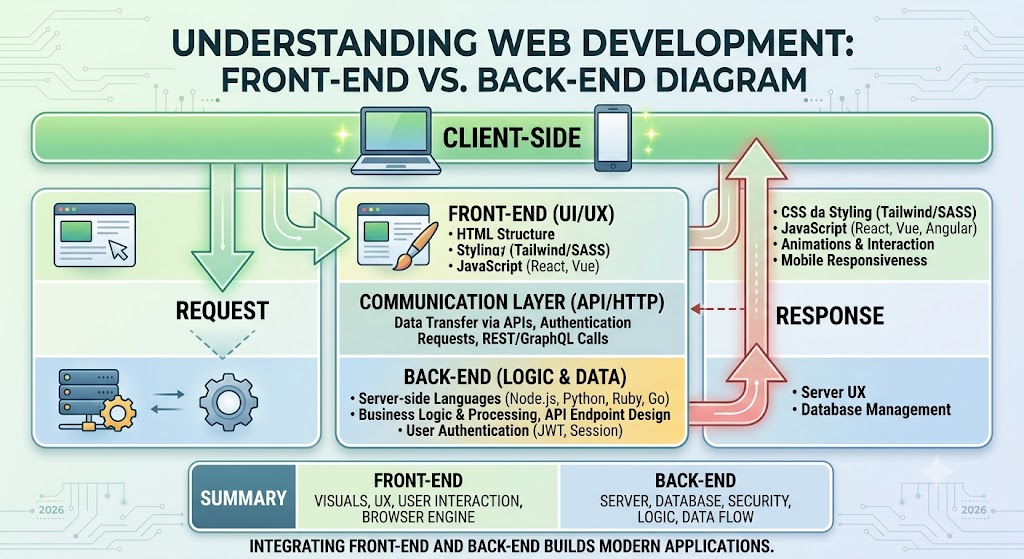
What it is:9The server-side part of a website, including databases, servers, and application logic that users don’t directly see but powers the site.
Why it matters:2There are four main components of a back-end development software stack: the server, the database, the operating system, and the software. When back-end systems are slow or poorly architected, users experience slow page loads, broken forms, and checkout failures — even if the front-end design looks perfect.
Example: When you submit a contact form, the back-end processes the data, stores it in a database, triggers an email notification, and returns a confirmation — all invisible to the user.
🔗 Internal Link: [Learn about WebFX’s back-end development services →]
Bandwidth
What it is:2Bandwidth refers to the maximum amount of data that can be transmitted between the Internet and your site in a given amount of time. Having a larger bandwidth allows you to move data faster and can improve user experience.
Why it matters: If your site experiences traffic spikes (product launches, viral content, seasonal peaks), insufficient bandwidth causes slowdowns or outages.
Example: A hosting plan with 10GB monthly bandwidth may work for a small blog, but an ecommerce site during a flash sale may need 100GB+ to avoid crashes.
Bootstrap
What it is:2A free, open-source, front-end framework for designing websites and web apps, developed by Mark Otto and Jacob Thornton at Twitter to encourage consistency across internal tools.
Why it matters: Bootstrap provides a library of pre-built responsive components (grids, buttons, navigation bars, forms) that dramatically speed up development time while ensuring cross-browser compatibility.
Example: A developer uses Bootstrap’s 12-column grid system to create a responsive layout in hours rather than coding a custom CSS grid from scratch.
Browser
What it is:2A program used to access the Internet and display web pages. When you type a web address or URL into a browser, it sends out a series of requests. It gathers different elements that make up the webpage, like images, ads, and content to display the page.
Why it matters: Different browsers (Chrome, Safari, Firefox, Edge) can render websites slightly differently, which is why cross-browser testing is essential before launch.
Example: A CSS animation may work perfectly in Chrome but look broken in Safari if browser-specific prefixes aren’t used.
Bug
What it is:2An error or flaw that prevents a website or app from running correctly.
Why it matters: Bugs range from minor visual glitches to critical issues that crash checkout flows or expose security vulnerabilities. A structured QA (Quality Assurance) process catches bugs before they reach your users.
Example: A button that works on desktop but doesn’t respond to taps on mobile devices.
Web Development Terms — C
Cache
What it is: A temporary storage layer that saves copies of files or data so they can be retrieved faster on subsequent requests.
Why it matters: Browser caching and server-side caching are critical for page speed. Cached resources don’t need to be re-downloaded, which reduces load times and server strain — directly improving Core Web Vitals scores.
Example: After your first visit to a website, your browser stores images and CSS files locally. On your next visit, the page loads significantly faster because it pulls those files from cache instead of re-downloading them.
What it is:3A Content Management System is a software that helps multiple users create, change, store, and oversee content on a website. It’s a tool that can help people build a website without writing code from scratch, often using templated pages and workflows. A CMS is web development terminology used by content managers, designers, and strategists, too.
Why it matters: A CMS empowers non-technical team members to publish blog posts, update product pages, and manage media without developer involvement — reducing bottlenecks and accelerating content production.
Example: WordPress, Drupal, Shopify, and HubSpot CMS are popular options. WordPress alone powers over 40% of all websites on the internet.
What it is:3HTTP cookies are small pieces of data that a server sends to a user’s web browser. Browsers store cookies to remember static information. Cookies are mainly used for personalization (user preference settings), session management (keeping users logged in, saving items in their shopping cart, etc.), and recording and analyzing user behavior and browsing sessions.
Why it matters: Cookies enable essential website functionality like staying logged in, remembering shopping cart contents, and personalizing content. However, privacy regulations (GDPR, CCPA) now require transparent cookie consent mechanisms.
Example: An ecommerce site uses cookies to remember items in your cart even if you close the browser and return later.
Core Web Vitals
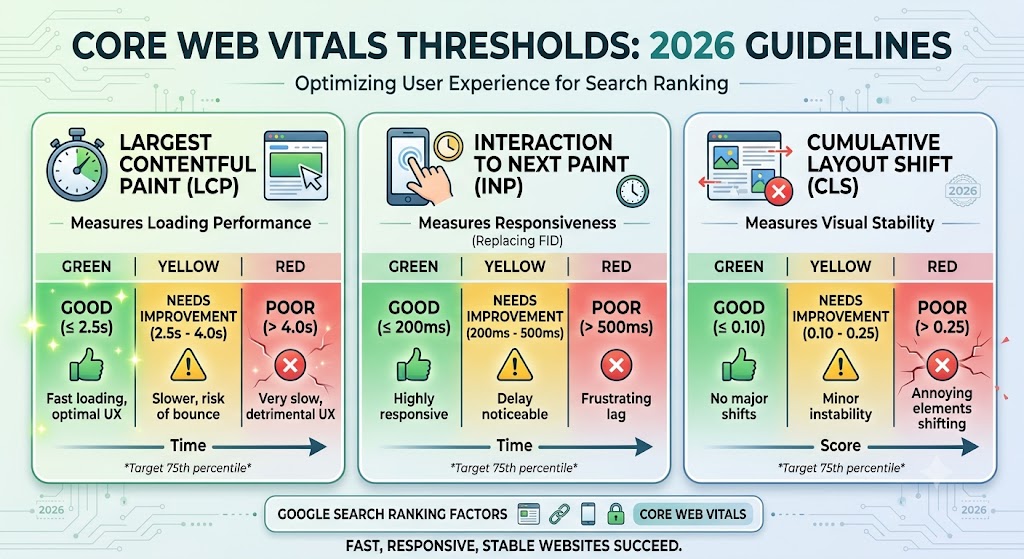
What it is:12The most important Core Web Vitals metrics — Largest Contentful Paint (LCP), Interaction to Next Paint (INP) (which replaced FID), and Cumulative Layout Shift (CLS) — measure how fast your site loads, how responsive it feels, and how visually stable it is.
Why it matters:12Passing these metrics leads to better Google rankings, reduced bounce rates, and higher conversions. 13Think of them as a tiebreaker that becomes increasingly important as other factors become equal. When your content matches search intent and your site has reasonable authority, Core Web Vitals can make the difference between position three and position eight.
The 2026 thresholds:
Metric
Good
Needs Improvement
Poor
LCP (loading speed)
≤ 2.5s
2.5s – 4.0s
> 4.0s
INP (responsiveness)
≤ 200ms
200ms – 500ms
> 500ms
CLS (visual stability)
≤ 0.1
0.1 – 0.25
> 0.25
Example:18Beyond SEO, Core Web Vitals directly impact conversion rates. Studies show that a one-second delay in page load time can reduce conversions by 7%.
🔗 Internal Link: [Get a free Core Web Vitals audit from WebFX →]
📊 [IMAGE SUGGESTION #1]Filename:core-web-vitals-thresholds-2026.pngAlt text:Core Web Vitals thresholds chart showing good, needs improvement, and poor ranges for LCP, INP, and CLS in 2026Description: A clean infographic showing the three metrics with color-coded threshold ranges (green/yellow/red).
CSS (Cascading Style Sheets)
What it is:3Cascading Style Sheets is a simple design language that streamlines the creation of web pages. CSS is aesthetic — it handles the look and feel of a web page. It outlines a page’s layout, colors, fonts, spacing, and more while also accounting for different devices and screen sizes.
Why it matters: CSS is what transforms a plain HTML document into a visually polished, branded website. Modern CSS enables responsive design, animations, dark mode, and complex layouts without JavaScript.
Example: CSS code like color: #2E86C1; font-size: 18px; font-family: 'Open Sans'; controls the exact appearance of your website’s text.
CDN (Content Delivery Network)
What it is: A geographically distributed network of servers that delivers cached web content to users from the server closest to their physical location.
Why it matters: CDNs dramatically reduce latency and load times for visitors worldwide. If your server is in New York but a visitor is in Tokyo, a CDN serves your content from a server in Asia instead of routing across the Pacific.
Example: Services like Cloudflare, AWS CloudFront, and Akamai power CDNs for brands of all sizes.
What it is: An automated software development practice where code changes are regularly merged, tested, and deployed to production with minimal manual intervention.
Why it matters:25A headless CMS integrates cleanly with CI/CD pipelines, DevOps processes, and microservices architectures. CI/CD reduces human error, speeds up releases, and ensures code quality through automated testing at every stage.
Example: A developer pushes a code update to GitHub, automated tests run immediately, and if all pass, the update deploys to the live site within minutes — no manual uploads or FTP required.
Web Development Terms — D
Database
What it is: An organized collection of structured data stored electronically, designed for efficient retrieval, updating, and management.
Why it matters: Databases store everything from user accounts and product inventories to blog posts and order histories. The choice of database (SQL vs. NoSQL) directly affects site speed, scalability, and data relationships.
Example: When you search for a product on an ecommerce site, the site queries its database (like MySQL or MongoDB) and returns matching results in milliseconds.
Debugging
What it is:3Debugging is the process of scanning a software for bugs (errors), finding them, and then removing or resolving them. It can sometimes take longer to debug a program or software than to code it.
Why it matters: Efficient debugging skills separate junior developers from seniors. Tools like browser DevTools, console logging, and debugging extensions make the process systematic rather than guesswork.
Example: Using Chrome DevTools to inspect why a CSS layout is breaking on tablet screen sizes.
DNS (Domain Name System)
What it is: The system that translates human-readable domain names (like webfx.com) into machine-readable IP addresses (like 192.168.1.1) that computers use to identify each other on the network.
Why it matters: DNS is essentially the internet’s phonebook. DNS misconfiguration can make your entire website inaccessible, and slow DNS resolution adds latency to every page load.
Example: When you type www.webfx.com into your browser, DNS servers resolve that to the correct IP address, routing your request to the right server.
Domain Name
What it is:3A domain name is the name of a website and part of the web address people use to find a website or webpage online. The domain name for this website is bighuman.com.
Why it matters: Your domain name is your digital identity. It affects brand perception, memorability, and even SEO. Choosing a clear, brandable domain name is one of the first strategic decisions in any web project.
Example:webfx.com is a domain name. The .com part is the top-level domain (TLD).
DOM (Document Object Model)
What it is: A programming interface that represents an HTML document as a tree structure of objects, allowing scripts to dynamically read, modify, add, or delete elements and content on a page.
Why it matters: The DOM is what makes web pages interactive. Every time JavaScript changes text, hides a menu, or updates a price on your page, it’s manipulating the DOM.
Example: When you click “Add to Cart” and the cart icon updates to show “1 item” without the page reloading — that’s JavaScript modifying the DOM.
Web Development Terms — E
Ecommerce Development
What it is: The process of building online stores and shopping experiences, including product catalogs, shopping carts, payment gateways, inventory management, and order fulfillment systems.
Why it matters: Ecommerce functionality requires specialized development for security (PCI compliance), performance (handling traffic spikes), and user experience (streamlined checkout flows that minimize cart abandonment).
Example: Building a Shopify or WooCommerce store with custom product filters, one-click checkout, and real-time shipping calculators.
🔗 Internal Link: [Explore WebFX’s ecommerce web design services →]
Edge Computing
What it is:29Edge computing moves server logic closer to the user, reducing latency and improving performance for real-time services.
Why it matters: Instead of routing every request to a central data center, edge computing processes data at servers geographically near the end user. This is critical for dynamic personalization, A/B testing, and real-time applications.
Example: Cloudflare Workers and Vercel Edge Functions run server-side code at 300+ global locations, delivering personalized content in under 50 milliseconds.
Web Development Terms — F
Favicon
What it is: The small icon displayed in browser tabs, bookmarks, and search results next to your website’s name.
Why it matters: A favicon reinforces brand identity and helps users quickly identify your site among multiple open tabs. Missing favicons look unprofessional and can hurt trust.
Example: The small “G” icon you see in the browser tab when visiting Google.com.
Firewall
What it is: A network security system that monitors and controls incoming and outgoing network traffic based on predetermined security rules.
Why it matters: Web Application Firewalls (WAFs) protect your site from common attacks like SQL injection, cross-site scripting (XSS), and DDoS attacks. They are a critical layer in any production website’s security stack.
Example: Cloudflare WAF or Sucuri blocking a brute-force login attempt before it reaches your server.
Framework
What it is:3A framework is a collection of tools and resources that help web developers build and manage websites and applications more efficiently. Frameworks house these tools in a central location, so engineers don’t have to search for each separately.
Why it matters: Frameworks enforce consistent coding patterns, reduce boilerplate work, and include pre-built solutions for common needs like routing, authentication, and database queries.
Example: React, Angular, and Vue.js (front-end); Django, Laravel, and Express.js (back-end); Next.js and Nuxt.js (full-stack).
Front-End
What it is:3This web development term defines the part of an app or website the user sees. It’s the visual elements and coding that dictate the way users interact with a product.
Why it matters: Front-end development directly shapes user experience. A beautiful design with poor front-end implementation (slow rendering, broken interactions, poor accessibility) drives users away regardless of how good the design looks in Figma.
Example: The navigation menu, hero banner, product cards, form fields, and buttons you interact with on any website — all front-end.
🔗 Internal Link: [See WebFX’s web design portfolio →]
🖼️ [IMAGE SUGGESTION #2]Filename:front-end-vs-back-end-diagram.pngAlt text:Diagram showing the difference between front-end (browser, HTML, CSS, JavaScript) and back-end (server, database, API, application logic) web developmentDescription: A split-screen illustration with the user-facing browser on the left labeled “Front-End” and the server/database infrastructure on the right labeled “Back-End,” connected by API arrows.
Web Development Terms — G
Git
What it is: A distributed version control system that tracks changes to code files, enabling multiple developers to collaborate on the same project without overwriting each other’s work.
Why it matters: Git is the industry standard for code management. It provides a complete history of every change, the ability to branch and merge features independently, and rollback capability if something breaks.
Example: A developer creates a feature/new-checkout branch, builds and tests the new checkout flow, then merges it into the main branch after code review — all tracked in Git.
GraphQL
What it is: A query language for APIs that allows clients to request exactly the data they need — no more, no less — in a single request.
Why it matters: Unlike REST APIs (which return fixed data structures), GraphQL eliminates over-fetching and under-fetching of data. This means faster page loads and more efficient mobile experiences.
Example: A product page requesting only the title, price, and thumbnail image from the database instead of receiving the entire product record including warehouse data, internal notes, and SEO metadata.
Web Development Terms — H
Headless CMS
What it is:24A headless CMS is a content management system where the backend (content repository) is completely separated from the frontend (presentation layer). Content is served via APIs to any platform — websites, mobile apps, smart devices, digital signage, and more.
Why it matters:22Headless architecture takes the decoupling principle further by separating content management from presentation. In traditional CMS architectures, content and presentation are tightly coupled — the CMS generates HTML pages. Headless CMSs provide content through APIs, allowing any frontend to consume and present that content.
Example: A company uses Contentful (headless CMS) to manage content that simultaneously powers their website (built in Next.js), their mobile app (React Native), and their in-store kiosk display — all from one content source.
🔗 Internal Link: [Talk to WebFX about headless CMS implementation →]
Hosting (Web Hosting)
What it is: The service that stores your website’s files on a server and makes them accessible via the internet 24/7.
Why it matters: Hosting quality directly impacts site speed, uptime, security, and scalability. Cheap shared hosting may work for a personal blog but can cripple a business site during traffic surges.
Example: Shared hosting (Bluehost), VPS (DigitalOcean), dedicated hosting, cloud hosting (AWS, Google Cloud), and managed WordPress hosting (WP Engine) represent increasing levels of performance and control.
HTML (HyperText Markup Language)
What it is: The foundational markup language used to structure content on the web. HTML defines the building blocks of every web page — headings, paragraphs, images, links, forms, and more.
Why it matters: HTML is the skeleton of every website. Clean, semantic HTML improves accessibility, SEO, and the ability of search engines and screen readers to understand your content.
Example:<h1>Welcome to WebFX</h1> creates a top-level heading. <a href="/contact">Contact Us</a> creates a clickable link.
HTTP / HTTPS
What it is: HTTP (HyperText Transfer Protocol) is the protocol for transferring data between a web browser and a server. HTTPS adds TLS encryption for security. 1HTTPS — HTTP over TLS. The encrypted, authenticated transport required for all production web traffic in 2026.
Why it matters: HTTPS is a confirmed Google ranking signal, and browsers now flag HTTP-only sites as “Not Secure.” Beyond rankings, HTTPS protects user data during transmission — essential for forms, logins, and payments.
Example: Every page on https://www.webfx.com is served over HTTPS, protecting visitor data and maintaining search rankings.
HTTP Status Codes (Overview)
What it is: Three-digit response codes returned by a server to indicate the result of a browser’s request.
Why it matters: Understanding status codes helps diagnose website issues quickly. They affect SEO (301 redirects preserve link equity; 404 errors waste crawl budget), user experience, and server health.
Key codes to know:
Code
Meaning
When you see it
200
OK — Request succeeded
Page loaded normally
301
Permanent Redirect
URL has moved permanently (passes SEO value)
302
Temporary Redirect
URL is temporarily at a different location
404
Not Found
Page doesn’t exist or URL is wrong
410
Gone
Page was intentionally removed permanently
500
Internal Server Error
Something broke on the server side
503
Service Unavailable
Server is overloaded or under maintenance
Example:4A 301 redirect is a method to permanently redirect one URL (web address) to another. It informs both users and search engines that the original URL has been moved or replaced by a new one.
🔗 Internal Link: [Learn how WebFX handles technical SEO and status code management →]
Web Development Terms — I–J
INP (Interaction to Next Paint)
What it is:19The Interaction to Next Paint (INP) represents the interactivity of your site. The metric measures how quickly the browser can update the layout after an interaction with a web page.
Why it matters:13The most significant change is the replacement of First Input Delay (FID) with Interaction to Next Paint (INP) as the responsiveness metric. FID only measured the delay until the browser could respond to the first interaction, whilst INP measures the full time until the visual response appears. This provides a more complete picture of how responsive your site feels to users.
Example: When a user clicks a “Filter Products” button and the page takes 400ms to show results, the INP is 400ms — in the “Needs Improvement” range.
Jamstack
What it is:21Jamstack is a web architecture approach built around pre-rendered frontends, API-driven services, and CDN-based delivery. Jamstack originally stood for JavaScript, APIs, and Markup.
Why it matters:23Pages are pre-rendered and served from CDNs, drastically reducing server load and improving load times. This makes sites extremely fast and scales easily: content-heavy sites, marketing pages, and e-commerce platforms can handle traffic spikes without elaborate backend infrastructure.
Example: A marketing website built with Next.js, content managed in Contentful (headless CMS), and deployed on Vercel’s global CDN — loading in under 1 second worldwide.
JavaScript (JS)
What it is: The primary programming language of the web that adds interactivity, dynamic behavior, and logic to websites and web applications.
Why it matters: JavaScript powers everything from simple form validations and dropdown menus to complex single-page applications (SPAs), real-time chat systems, and interactive data visualizations. It runs in every modern browser without plugins.
Example: An auto-complete search bar that shows suggestions as you type, a real-time stock price ticker, or a dynamic pricing calculator.
Web Development Terms — K–L
Keyword (SEO Context)
What it is: A word or phrase that describes the content on a web page, used by search engines to match pages with user search queries.
Why it matters: Strategic keyword usage in page titles, headings, meta descriptions, and body content helps search engines understand your page’s topic and rank it for relevant queries.
Example: This glossary page targets keywords like “web development terms,” “web development glossary,” and “web dev terminology” to match what business owners and marketers are searching for.
🔗 Internal Link: [Explore WebFX’s keyword research services →]
Landing Page
What it is:4A landing page is a standalone web page designed for a specific purpose, often used in marketing campaigns. Its goal is to provide focused information about a product or service and encourage users to specific actions like signing up or making a purchase.
Why it matters: Dedicated landing pages consistently outperform generic website pages for conversions because they eliminate distractions and focus entirely on one goal.
Example: A PPC ad for “free SEO audit” links to a landing page with a headline, three bullet points of benefits, a testimonial, and a single form — nothing else.
What it is:4Lazy loading is a technique used to improve website performance by loading content (usually images) only when it becomes visible in the user’s browser viewport. This reduces initial page load times and saves bandwidth.
Why it matters: Lazy loading directly improves LCP (Largest Contentful Paint) scores by reducing the number of resources the browser needs to download before the page becomes visually complete.
Example: A blog post with 15 images only loads the first 3 immediately; the remaining 12 load as the user scrolls down to them.
Web Development Terms — M–N
Mobile-First Design
What it is: A design philosophy that starts the design process with the mobile (smallest screen) experience and progressively enhances for larger screens.
Why it matters:17In 2026, with the majority of traffic coming from mobile devices, delivering a mobile-first, high-performance experience is critical. Google uses mobile-first indexing, meaning it primarily evaluates the mobile version of your site for rankings.
Example: Designing the navigation as a hamburger menu for mobile first, then expanding to a full horizontal nav bar on desktop.
🔗 Internal Link: [See WebFX’s responsive web design services →]
Node.js
What it is: An open-source, cross-platform JavaScript runtime environment that allows developers to run JavaScript on the server side (back-end), outside of a web browser.
Why it matters: Node.js enables full-stack JavaScript development — the same language for front-end and back-end — which simplifies hiring, code sharing, and development speed.
Example: Netflix, LinkedIn, and PayPal use Node.js for their server-side applications because of its speed and scalability.
Web Development Terms — O–P
Open Source
What it is: Software whose source code is freely available for anyone to use, modify, and distribute.
Why it matters: Open-source projects benefit from community-driven development, transparency, and often lower costs. However, they require proper maintenance, security patching, and sometimes lack dedicated support.
Example: WordPress, React, Node.js, and Linux are all open-source projects that power large portions of the internet.
[H3] Page Speed
What it is: A measurement of how quickly the content on a web page loads and becomes interactive for the user.
Why it matters: Page speed is a direct Google ranking factor and a critical driver of user experience. 18Users expect pages to load in under three seconds, and 53% will abandon a site that takes longer.
Example: Compressing images, minifying CSS/JS files, enabling caching, and using a CDN can collectively improve page speed by 40–60%.
🔗 Internal Link: [Get a free page speed analysis from WebFX →]
PHP
What it is: A widely-used, open-source server-side scripting language designed for web development. PHP code executes on the server and generates HTML that is sent to the browser.
Why it matters: PHP powers approximately 77% of websites with a known server-side language, including WordPress, Facebook (historically), and Wikipedia. Understanding PHP is essential when working with WordPress-based sites.
Example: WordPress themes and plugins are written in PHP. When you install a contact form plugin, it uses PHP to process form submissions on the server.
Progressive Web App (PWA)
What it is:29PWAs are web apps with native app-like capabilities — but delivered through a browser. Users can install them, use them offline, and receive push notifications.
Why it matters: PWAs combine the reach of web with the experience of native apps — no app store required. They work offline, load instantly, and can be added to a device’s home screen.
Example: Twitter Lite, Pinterest, and Starbucks all offer PWA versions that provide app-like experiences without requiring downloads from app stores.
Web Development Terms — R
Responsive Design
What it is: A web design approach that makes web pages render well on all screen sizes and devices by using flexible grids, fluid images, and CSS media queries.
Why it matters: Responsive design is non-negotiable in 2026. Google uses mobile-first indexing, which means a non-responsive site will rank poorly regardless of content quality. It also eliminates the need to maintain separate mobile and desktop sites.
Example: A three-column product grid on desktop that automatically reorganizes into a single-column scrollable list on mobile screens.
What it is: An architectural style for building web services that use standard HTTP methods (GET, POST, PUT, DELETE) to enable communication between client and server.
Why it matters: REST APIs are the most common way modern websites and applications exchange data. They power everything from social media feeds to payment processing to CMS content delivery.
Example: A mobile app sends a GET request to api.example.com/products and receives a JSON response with product data to display.
Web Development Terms — S
Schema Markup (Structured Data)
What it is: A standardized vocabulary of tags added to HTML that helps search engines understand the context and meaning of your content.
Why it matters: Schema markup enables rich results in Google (star ratings, FAQ dropdowns, product prices, event details), which increase click-through rates by 20–30% compared to standard blue links.
Example: Adding FAQPage schema to a FAQ section tells Google to display expandable Q&A directly in search results. Adding Product schema shows price, availability, and reviews.
🔗 Internal Link: [Learn about WebFX’s SEO services and structured data implementation →]
Serverless
What it is:29With serverless, you don’t manage servers. Instead, you deploy functions that are triggered by events (e.g., HTTP requests, file uploads, cron jobs). Infrastructure is abstracted and automatically scaled.
Why it matters: Serverless architecture reduces operational overhead, scales automatically with demand, and follows a pay-per-use model — you only pay when your code runs.
Example: AWS Lambda, Google Cloud Functions, and Cloudflare Workers are popular serverless platforms. A contact form submission triggers a serverless function that processes the data and sends a notification email.
SSL/TLS Certificate
What it is:1TLS — Transport Layer Security. The cryptographic protocol that encrypts traffic between clients and servers on the web. An SSL/TLS certificate authenticates a website’s identity and enables encrypted HTTPS connections.
Why it matters: SSL is required for HTTPS, which is a Google ranking factor. It protects sensitive data in transit (passwords, credit cards, personal information) and displays the padlock icon that signals trust to users.
Example: When you see https:// and a padlock icon in your browser’s address bar, the site has a valid SSL/TLS certificate.
Sitemap
What it is: An XML file that lists all the important pages on your website, helping search engines discover and crawl your content efficiently.
Why it matters: A sitemap acts as a roadmap for search engine crawlers. It’s especially important for large sites, new sites, and sites with pages that aren’t well-linked internally.
Example: Submitting your sitemap at webfx.com/sitemap.xml via Google Search Console ensures all your key pages are indexed.
🔗 Internal Link: [Learn about WebFX’s technical SEO audits →]
Web Development Terms — T–U
TypeScript
What it is: A superset of JavaScript that adds static type checking, helping developers catch errors during development rather than at runtime.
Why it matters: TypeScript has become the industry standard for large-scale web applications because it improves code reliability, makes refactoring safer, and provides better IDE support with auto-complete and inline error detection.
Example: In TypeScript, defining function calculatePrice(quantity: number, price: number): number ensures the function only accepts numbers — catching bugs before they reach users.
UI (User Interface)
What it is: The visual elements through which a user interacts with a website or application — buttons, menus, forms, icons, typography, color schemes, and layout.
Why it matters: Good UI design makes interfaces intuitive, efficient, and visually appealing. Poor UI creates friction, confusion, and abandonment.
Example: A clean checkout page with clearly labeled form fields, a visible “Place Order” button, and a progress indicator showing “Step 2 of 3.”
UX (User Experience)
What it is: The overall experience a user has when interacting with a website, encompassing ease of use, accessibility, satisfaction, and the efficiency with which they can achieve their goals.
Why it matters: UX goes beyond visual design. It includes information architecture, navigation flow, page load speed, error handling, and content clarity. Great UX directly correlates with higher conversions and lower bounce rates.
Example: A site with beautiful design but a 5-step checkout process has worse UX than a simple site with a 1-click purchase option.
What it is: A system for tracking and managing changes to code over time, allowing multiple developers to collaborate without conflicts and providing the ability to revert to previous versions if needed.
Why it matters: Version control (primarily Git) is the backbone of professional web development. Without it, teams risk overwriting each other’s work, losing code, and having no audit trail for changes.
Example: GitHub, GitLab, and Bitbucket are popular platforms built on Git for hosting, reviewing, and managing code repositories.
WCAG (Web Content Accessibility Guidelines)
What it is: The international standard (published by W3C) for making web content accessible to people with disabilities. WCAG 2.2 is the current version in 2026.
Why it matters: WCAG compliance is both an ethical imperative and increasingly a legal requirement. It also improves SEO, as accessible markup helps search engines better understand your content.
Example: WCAG Level AA requires text to have a minimum contrast ratio of 4.5:1 against its background, all images to have descriptive alt text, and all interactive elements to be keyboard-accessible.
🔗 Internal Link: [Learn about WebFX’s accessibility audit services →]
Wireframe
What it is: A simplified, low-fidelity visual representation of a web page’s layout that outlines the structure, content placement, and functionality — without colors, images, or detailed styling.
Why it matters: Wireframes enable stakeholders to review and approve page structure and user flow before any design or development work begins, preventing costly revisions later.
Example: A wireframe for a homepage might show gray boxes for the hero image, navigation menu, three feature columns, and a footer — with labels but no branding.
WordPress
What it is: The world’s most popular open-source CMS, powering over 40% of all websites on the internet. Originally built for blogging, it has evolved into a full-featured platform for building any type of website.
Why it matters: WordPress’s massive plugin ecosystem (60,000+ plugins), theme marketplace, and large developer community make it one of the most flexible and cost-effective website platforms available.
Example: From small business sites and blogs to enterprise news outlets (TechCrunch, The New Yorker) and ecommerce stores (via WooCommerce).
🔗 Internal Link: [See WebFX’s WordPress development services →]
Web Development Security Terms
1 Security and operational practices are inseparable from modern web development. The terms below span application-level vulnerabilities, deployment pipelines, and identity protocols.
XSS (Cross-Site Scripting)
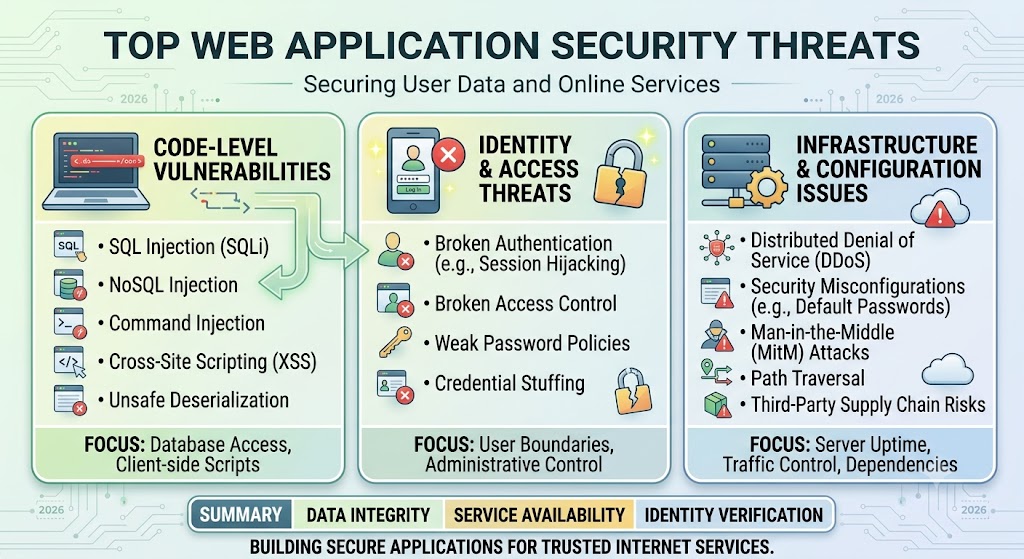
What it is:1XSS — Cross-Site Scripting. An attack where an attacker injects script into a trusted page to run in a victim’s browser.
Why it matters: XSS attacks can steal session cookies, redirect users to malicious sites, or modify page content. Preventing XSS requires input validation, output encoding, and Content Security Policy (CSP) headers.
CSRF (Cross-Site Request Forgery)
What it is:1CSRF — Cross-Site Request Forgery. An attack that tricks a logged-in user’s browser into issuing unwanted requests to a target site.
Why it matters: CSRF attacks can force users to unknowingly transfer funds, change email addresses, or modify account settings. Anti-CSRF tokens and SameSite cookie attributes are standard defenses.
CSP (Content Security Policy)
What it is:1CSP — Content Security Policy. A response header declaring which script, style, and other resource origins the browser may load.
Why it matters: CSP is one of the strongest defenses against XSS attacks, preventing unauthorized scripts from executing even if an attacker finds an injection point.
🖼️ [IMAGE SUGGESTION #3]Filename:web-security-threats-infographic.pngAlt text:Infographic illustrating common web security threats including XSS, CSRF, SQL injection, and DDoS with prevention methodsDescription: Visual showing attack types on the left with corresponding defense mechanisms on the right, connected by arrows.
Frequently Asked Questions About Web Development Terms
What are the most important web development terms to learn first?
5 Start with HTML, CSS, JavaScript, front end vs. back end, and responsive design. Add a few “stick-with-you” fundamentals: how HTTP works (methods, headers), basic networking (TCP/UDP, ports), what a browser does to load a page, and accessibility. 5 Include security basics (XSS, SQL injection — see OWASP Top 10) and a quick grasp of databases (relational vs. document). Knowing performance terms (Core Web Vitals, caching/CDN) and DNS basics helps in real projects. If you have time, learn version control (Git) and the idea of system design — they pay off early.
What is the difference between front-end and back-end development?
5 Front end is the user-facing layer: layout, visuals, and interactions in the browser or app (think HTML, CSS, JavaScript, accessibility, and performance across devices). Back-end development encompasses the server, database, application logic, and APIs that power those front-end experiences behind the scenes. Most modern websites require both, and full-stack developers work across both layers.
Why should non-developers learn web development terminology?
5 Knowing these terms is useful beyond definitions. It makes it easier to read proposals with confidence, understand what vendors are promising, and keep project conversations focused on business goals instead of getting lost in technical jargon. Whether you’re reviewing a website redesign quote, giving feedback on a wireframe, or evaluating hosting options, vocabulary reduces miscommunication and accelerates decision-making.
What are Core Web Vitals and why do they matter?
12 The most important Core Web Vitals metrics — Largest Contentful Paint (LCP), Interaction to Next Paint (INP), and Cumulative Layout Shift (CLS) — measure how fast your site loads, how responsive it feels, and how visually stable it is. Passing these metrics leads to better Google rankings, reduced bounce rates, and higher conversions.
What is a headless CMS and when should I use one?
24 A headless CMS is a content management system where the backend (content repository) is completely separated from the frontend (presentation layer). Content is served via APIs to any platform — websites, mobile apps, smart devices, digital signage, and more. Use a headless CMS when you need to deliver content across multiple channels from a single source, or when your development team wants the freedom to use modern front-end frameworks like React or Next.js.
📥 [CTA — Mid-Page Lead Magnet]Not sure which development approach is right for your business? Talk to a WebFX strategist for a free consultation. We’ll evaluate your current site, identify opportunities, and recommend a technology stack tailored to your goals. [Get My Free Consultation →]
How to Use This Glossary to Improve Your Web Projects
Knowing the terms is the first step. Here’s how to put them into action:
1. When reviewing a proposal or SOW (Statement of Work): Cross-reference technical terms against this glossary. If a vendor mentions “headless CMS architecture with CI/CD pipelines deployed to edge nodes,” you now know exactly what they’re promising — and can ask informed follow-up questions.
2. When communicating with your development team: Use the correct terminology to describe issues and requests. Instead of “the page is slow,” say “our LCP is above 4 seconds — can we optimize the hero image and defer non-critical JavaScript?” This leads to faster resolutions.
3. When evaluating your website’s performance: Run your site through Google PageSpeed Insights and Google Search Console. Use the Core Web Vitals definitions above to interpret your scores and prioritize improvements.
4. When planning a redesign or new build: Use the architecture terms (Jamstack, headless CMS, responsive design, serverless) to evaluate whether your current stack is still serving your business goals — or whether a modern approach would deliver better speed, scalability, and conversions.
Understanding web development terminology is the foundation. But turning that knowledge into a fast, secure, high-converting website requires the right partner.
WebFX has driven real results for over 1,000 clients:
🚀 $10 billion+ in client revenue generated
📈 24 million+ leads driven for clients
🏆 500+ digital marketing experts on staff
⭐ 200+ five-star Google reviews
Whether you need a complete website redesign, a performance optimization audit, SEO strategy, or a custom web application, our team has the technical expertise and the business acumen to deliver measurable results.
🎯 [PRIMARY CTA — Bottom of Page]Get a free, no-obligation website audit and proposal. Our team will analyze your current site’s performance, SEO, design, and conversion potential — and deliver a custom strategy tailored to your goals.
[Get My Free Website Audit →]
Or call us at 888-601-5359 to speak with a strategist today.
📬 [SECONDARY CTA — Newsletter]Get weekly web development & digital marketing tips delivered to your inbox. Join 200,000+ marketers who subscribe to Revenue Weekly for actionable insights, industry trends, and exclusive strategies.
[Subscribe to Revenue Weekly →]
INTERNAL LINKING MASTER LIST
Term in Glossary
Suggested Internal Link Target
Accessibility (A11y)
/web-design/accessibility/
API
/web-development/web-application-development/
Back-End
/web-development/back-end/
CMS
/web-development/cms/
Core Web Vitals
/seo/page-speed/
Ecommerce
/web-design/ecommerce/
Front-End
/web-design/portfolio/
Headless CMS
/web-development/
Keyword
/seo/keyword-research/
Landing Page
/web-design/landing-page-design/
Mobile-First
/web-design/responsive/
Page Speed
/seo/page-speed-optimization/
Responsive Design
/web-design/responsive/
Schema Markup
/seo/structured-data/
SEO
/seo/
Sitemap
/seo/technical-seo/
UX Design
/web-design/ux/
WCAG
/web-design/accessibility/
WordPress
/web-development/wordpress/
IMAGE SUGGESTIONS — COMPLETE LIST
#
Filename
Alt Text
Placement
1
core-web-vitals-thresholds-2026.png
Core Web Vitals thresholds chart showing good, needs improvement, and poor ranges for LCP, INP, and CLS in 2026
Core Web Vitals definition
2
front-end-vs-back-end-diagram.png
Diagram showing the difference between front-end and back-end web development layers
Front-End definition
3
web-security-threats-infographic.png
Infographic illustrating common web security threats including XSS, CSRF, SQL injection with prevention methods
Security Terms section
4
how-dns-works-diagram.png
Diagram showing how DNS resolves a domain name to an IP address step by step
DNS definition
5
headless-cms-vs-traditional-cms.png
Comparison diagram showing headless CMS architecture with API delivery versus traditional coupled CMS architecture
Headless CMS definition
6
http-request-response-cycle.png
Illustration of the HTTP request-response cycle between browser and server
HTTP/HTTPS definition
7
responsive-design-breakpoints.png
Visual showing how a responsive website layout adapts across mobile, tablet, and desktop screen sizes
Responsive Design definition
8
website-glossary-download-cta.png
Promotional banner for downloading the free web development glossary PDF
This article is now CMS-ready. Copy the meta fields, schema blocks, article body, and image specs directly into your publishing workflow. If you need me to expand any specific section (e.g., add 20 more terms, draft the downloadable PDF content, or write the email nurture sequence for glossary PDF leads), just let me know.
📋 CMS PUBLISHING GUIDE — FIELD-BY-FIELD
META FIELDS
Meta Title (60 characters max):Web Development Glossary: 100+ Essential Terms for 2026
Meta Description (155 characters max):Master 100+ web development terms explained in plain language. Covers front-end, back-end, APIs, CMS, SEO, security & more. Updated for 2026.
Author Byline:[Author Name], Senior Web Developer at WebFX | 15+ years of experience building high-performance websites for Fortune 500 brands and growing businesses alike.
SCHEMA MARKUP (Add to <head> or via CMS schema plugin)
JSON{
  "@context": "https://schema.org",
  "@type": "Article",
  "headline": "Web Development Glossary: 100+ Essential Terms for 2026",
  "description": "A comprehensive glossary covering 100+ web development terms including front-end, back-end, APIs, CMS, security, performance, and SEO — explained in plain language for business owners, marketers, and developers.",
  "author": {
    "@type": "Person",
    "name": "[Author Name]",
    "jobTitle": "Senior Web Developer",
    "worksFor": {
      "@type": "Organization",
      "name": "WebFX"
    }
  },
  "publisher": {
    "@type": "Organization",
    "name": "WebFX",
    "logo": {
      "@type": "ImageObject",
      "url": "https://www.webfx.com/logo.png"
    }
  },
  "datePublished": "2024-01-15",
  "dateModified": "2026-07-01",
  "mainEntityOfPage": "https://www.webfx.com/web-development/glossary/"
}
DefinedTermSet Schema (add for rich results):
JSON{
  "@context": "https://schema.org",
  "@type": "DefinedTermSet",
  "name": "Web Development Glossary",
  "description": "100+ web development terms and definitions for 2026",
  "definedTerm": [
    {
      "@type": "DefinedTerm",
      "name": "API (Application Programming Interface)",
      "description": "A set of rules and protocols that allow different software applications to communicate with each other and share data."
    },
    {
      "@type": "DefinedTerm",
      "name": "Back-End",
      "description": "The server-side layer of a website that handles databases, server logic, authentication, and application architecture — everything users don't directly see."
    },
    {
      "@type": "DefinedTerm",
      "name": "CMS (Content Management System)",
      "description": "Software that allows users to create, manage, and publish website content without writing code from scratch."
    }
  ]
}
⚠️ Note: Replicate the DefinedTerm block for every term in the glossary. Only three are shown as examples.
JSON{
  "@context": "https://schema.org",
  "@type": "FAQPage",
  "mainEntity": [
    {
      "@type": "Question",
      "name": "What are the most important web development terms to learn first?",
      "acceptedAnswer": {
        "@type": "Answer",
        "text": "Start with HTML, CSS, JavaScript, front-end vs. back-end, responsive design, CMS, API, domain, hosting, and SSL. These terms form the foundation for understanding how any website is built and managed."
      }
    },
    {
      "@type": "Question",
      "name": "What is the difference between front-end and back-end development?",
      "acceptedAnswer": {
        "@type": "Answer",
        "text": "Front-end development covers everything the user sees and interacts with in the browser — layout, design, buttons, and navigation. Back-end development handles the server, database, application logic, and authentication that power those front-end experiences behind the scenes."
      }
    },
    {
      "@type": "Question",
      "name": "Why should non-developers learn web development terminology?",
      "acceptedAnswer": {
        "@type": "Answer",
        "text": "Knowing web development vocabulary helps you communicate clearly with developers, review proposals with confidence, provide better project feedback, and make smarter decisions about your digital strategy — whether you are a business owner, marketer, or project manager."
      }
    },
    {
      "@type": "Question",
      "name": "What are Core Web Vitals and why do they matter?",
      "acceptedAnswer": {
        "@type": "Answer",
        "text": "Core Web Vitals are three Google metrics — Largest Contentful Paint (LCP), Interaction to Next Paint (INP), and Cumulative Layout Shift (CLS) — that measure loading speed, responsiveness, and visual stability. They are a confirmed Google ranking factor and directly impact user experience, bounce rates, and conversions."
      }
    },
    {
      "@type": "Question",
      "name": "What is a headless CMS and when should I use one?",
      "acceptedAnswer": {
        "@type": "Answer",
        "text": "A headless CMS separates the content management back-end from the front-end presentation layer, delivering content via APIs. It is ideal for businesses that need to publish content across multiple channels (websites, mobile apps, smart devices) from one centralized source."
      }
    }
  ]
}